
clients can now access the client portal via a magic link instead of needing to remember a password.
Clients click a link in their email, verify their email, and they’re in. No password required.
Once logged in, they can see their client portal as well as a list of their requests. When you send a file to a client, they will automatically receive a magic link. This is useful for clients who only log in a few times a year and inevitably forget their credentials.
Less friction for them, fewer “I can’t log in” support messages for you.
| Note: Magic links are enabled by default. |
How to change the magic links settings
Should you wish to disable this feature, click your avatar in the top right corner and go to Settings → Security & Access → Enable Magic Links. Click the toggle bar to change the settings and click Save:
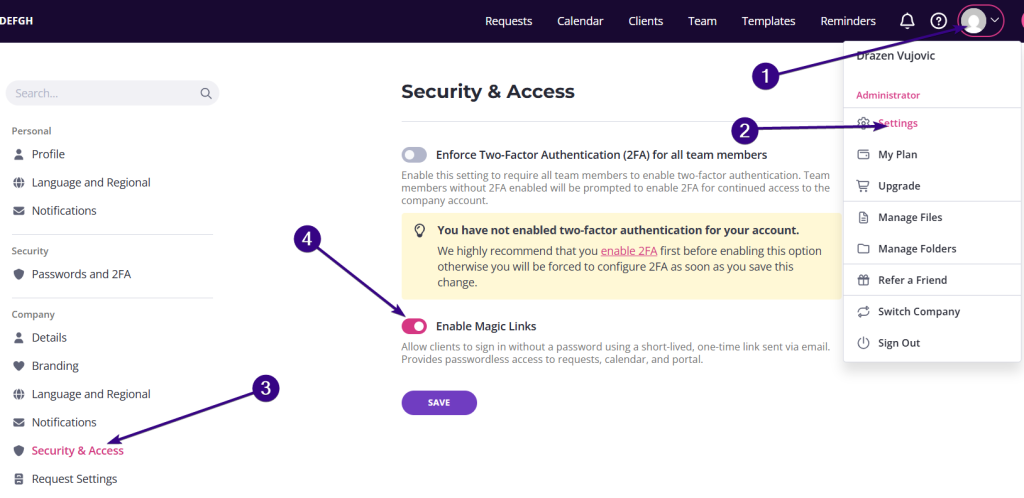
You can repeat this same process to reactivate magic links.
Link expiration and verification
For security, magic links expire after a short time (6 hours). If the link has expired, the client can:
- Enter their email address
- Receive a verification code
- Enter the code to regain access
They can also choose to sign in from the same screen if needed.
| Note: Clients can still access requests directly from reminder emails as usual. |