
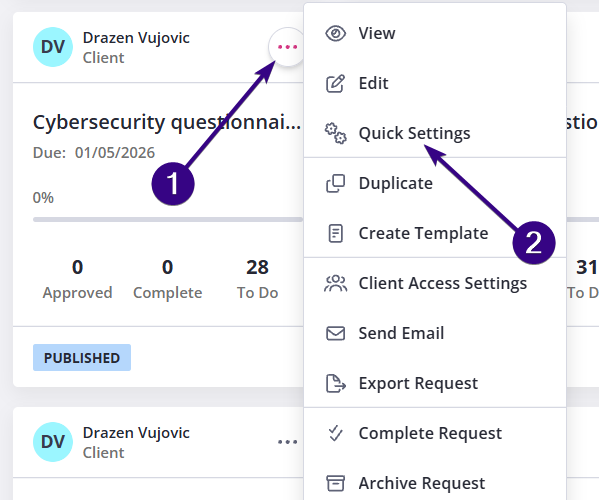
To pause or stop sending automatic reminders to your client, click the dotted menu in the upper-right corner of the request and select Quick Settings:
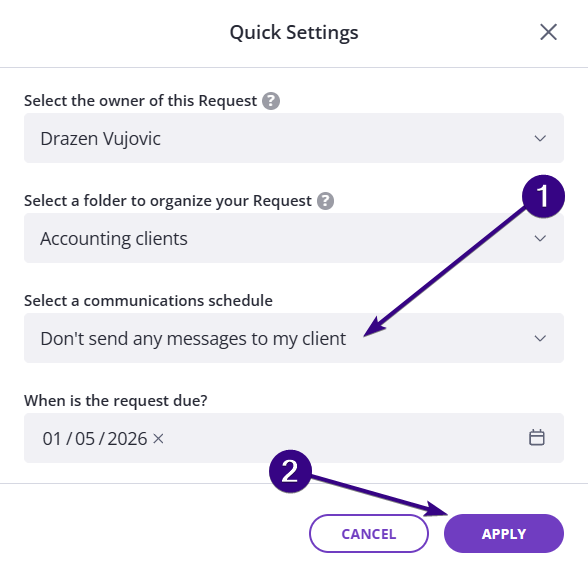
Inside the Quick Settings menu, change the reminder schedule to Don’t send any messages to my client and click Apply:
Turning reminders back on
Should you wish to turn automatic reminders on again, go to the same Quick Settings menu to select your preferred schedule.
| Note: If several days have passed while reminders were paused, check the request’s due date before turning them back on. Some reminder schedules are triggered based on how close the request is to its due date. If the due date is already in the past or too close, reminders may not trigger as expected. |