
If your client isn’t receiving emails, the cause is usually related to email filtering, reminder settings, or a bounced email address. In most cases, the issue can be resolved quickly by checking a few common settings.
1. The email went to spam or was blocked
The most common reason is that the email was filtered by the client’s email provider. Ask your client to:
- Check their Spam or Junk folder
- Search it for emails from Content Snare
- Mark the email as Not Spam if it appears in the spam folder
If their organization uses strict email filtering, they may also need to whitelist Content Snare’s sending domain with their IT team so future emails are delivered normally.
2. The client’s email address bounced
If an email hard bounces (meaning the receiving server reports the address as invalid), our email provider automatically stops sending future emails to that address. This protects overall email deliverability because repeatedly sending to invalid addresses can cause messages to be blocked globally.
When this happens, the address is placed on a suppression list, which prevents further emails from being sent. If you believe the email address is valid, contact our support team at support@contentsnare.com or leave a message using the chat widget. That way, we can remove the address from the suppression list so emails start sending again.
3. Email notifications are disabled in the publish settings
When publishing a request, certain communication schedule options can prevent emails from being sent:
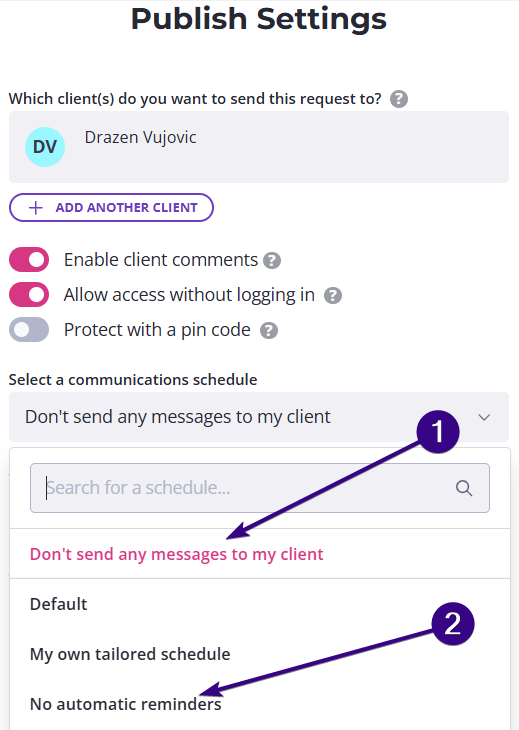
The first one is Don’t send any messages to my client. In this case, all emails and SMS notifications are disabled, which means your client will not receive the initial request email or any reminders. In this case, you’ll need to manually send emails to your client.
Another possibility is selecting the No automatic reminders schedule. In this case, your client will receive the initial request email, but no reminder emails will be sent afterward. If you want Content Snare to send reminders automatically, choose a schedule that includes reminder emails.