
The new Recurring/Bulk Requests feature acts as a request generator that allows users to automatically create multiple requests from a single template without manual intervention after setup.
With just a few clicks, it is possible to send identical requests to multiple clients at the same time. This is suitable for collecting the same information on a regular basis, like:
- Monthly client check-ins
- Ongoing compliance documents
- Regular queries
- Recurring marketing campaign inputs
- Anything else that comes up again and again
Users can create requests that are either sent once to multiple clients simultaneously (bulk) or scheduled to repeat on a regular basis (recurring).
To access them, go to the Recurring/Bulk tab in the upper-left corner of the dashboard:

To find a specific recurring request, users can apply status filters and choose from:
- Draft
- Active
- Paused
- Complete
The system enables users to customize the generated request titles, with variables like client name and publishing date, set standard request durations, and view all requests created by a specific recurring request in a dedicated details page.
The View Details option provides a comprehensive look at a request’s history, including all generated requests. You can also manage these individually, just like standard requests.
Setting up a new Recurring/Bulk Request
To create a new Recurring/Bulk Request, click the Add New button (soon to become Quick Actions) in the upper-right corner of the dashboard.

After that, choose a template that you want to send out to multiple clients. Once done, select the desired recipients from your client list.
| Note: There is no limit on how many clients can receive this request, though the number of active requests depends on your account plan. |
Users can opt for an immediate start or choose a specific date:

Multiple options are available for defining when the recurring request ends:
- It can continue indefinitely
- It can stop after a specific date
- It can end after a set number of occurrences
The default request duration (due date) is 14 days, but it’s possible to adjust it. For those requiring repeated scheduling, the feature allows requests to be triggered weekly, monthly, or yearly:

The Recurring/Bulk Requests feature significantly optimizes the process of sending identical requests to multiple clients or on a regular schedule, saving time for users who previously had to create each request individually.
CSV import for bulk and recurring requests
Bulk and recurring requests now support CSV client import, making it much easier to send requests to large groups of clients at once. During the client selection step, choose the CSV import option instead of selecting clients manually:
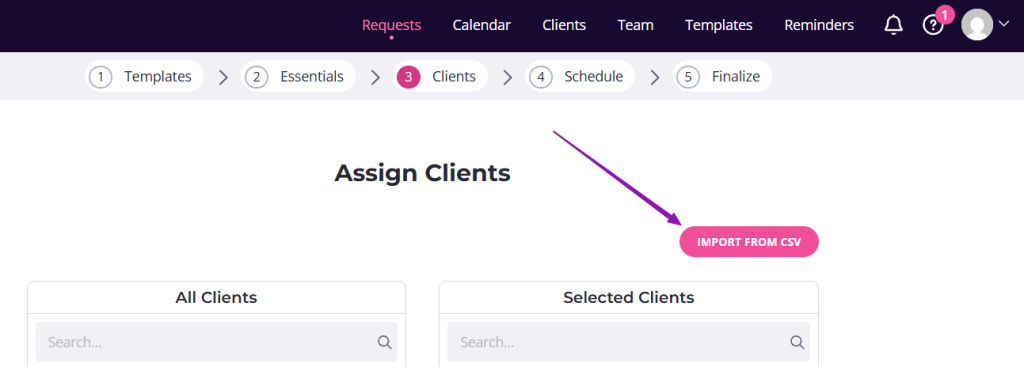
Once there, upload your CSV file by dragging and dropping it into the upload area or clicking to browse your computer.
| Note: You can import a maximum of 500 clients at a time. |
Related post: