Content Snare makes it simple to collect client information and documents. Use it for client onboarding, month-end checklists or end of year tax.
With all client files in one place, your team can work on actual accounting instead of constantly chasing clients for information.


Content Snare is a secure client portal for accounting firms and bookkeepers.
It handles the part of your workflow that practice management tools don't do well: getting clients to send you their tax return documents, onboarding paperwork, and compliance records.
Instead of chasing clients by email, you give them a secure portal where they upload what you need, answer your questions, and complete tasks on their own time.
Automatic reminders do the follow-up for you.
But most importantly, clients actually use it.

I used to track my incoming and outgoing emails per day. Before Content Snare, I was sending around 120 emails a day. With Content Snare, that dropped to about 60. People were blown away by that.

Your clients fill out a simple checklist. Everything saves automatically. If they close their browser, a gentle reminder brings them back. No confusion, no lost documents, no back-and-forth.
Experience it for yourself in under 2 minutes.
Here are a few ways accountants & bookkeepers use Content Snare to save time and improve client relationships.

Gather all the information you need to start the job, without the constant email back-and-forth and messy spreadsheets. Customers report an average 71% reduction in turnaround time.

Any time you have questions for your client, send them via Content Snare. All of your client's answers and documents will be available in one place.

Cloud storage and client portals become a dumping ground for documents. They're also difficult for your clients to use. Content Snare provides them with a simple checklist and keeps them accountable.

Verify your client's identity and screen them against AML databases (PEP, sanctions and more) to meet your compliance requirements.

Content Snare walks your clients through the process of connecting with your firm. Our built-in templates have helped clients complete the process in as little as 20 minutes.

Sync clients to and from XPM. Push client data and files into FYI, SuiteFiles, OneDrive, Sharepoint, Dropbox and Google Drive. Integrate with 5000+ apps through Zapier and Make.


In accounting, you need a lot of information from clients. But if you request even a few documents, the process can drag out for months.
Clients will send the wrong information, or nothing at all. They'll delay for weeks before sending you everything at once. In the same breath they'll blame you for taking too long.
When you need to request documents every month to keep their books up to date, the requests pile up.
Your team end up spending too much time chasing clients that would be better spent on actual accounting.


Content Snare transforms the way you collect information from your clients - turning a tangled mess into a smooth end-to-end process.
Intuitive and dead simple to use, it’s your single source of truth. Plan, request and approve documents in one place quickly, simply and accurately.
Your entire team will be on the same page, knowing what's been provided or approved, and what's still outstanding.
Give your clients mistake-proof instructions, then enjoy liberating freedom from chasing them (while Content Snare gives them a gentle nudge when needed).
If they submit an incorrect document, request a new one right there in Content Snare without sending yet another email. It's easy for you and easy for your clients.

"We cut down our administration time on collecting information by 75%, well in excess of 0.5 FTE at peak times. A huge cost saving and our clients love the format."

“Content Snare has freed up time for accountants who should be doing accounting - not chasing documentation."

Create as many clients or recipients as you need.

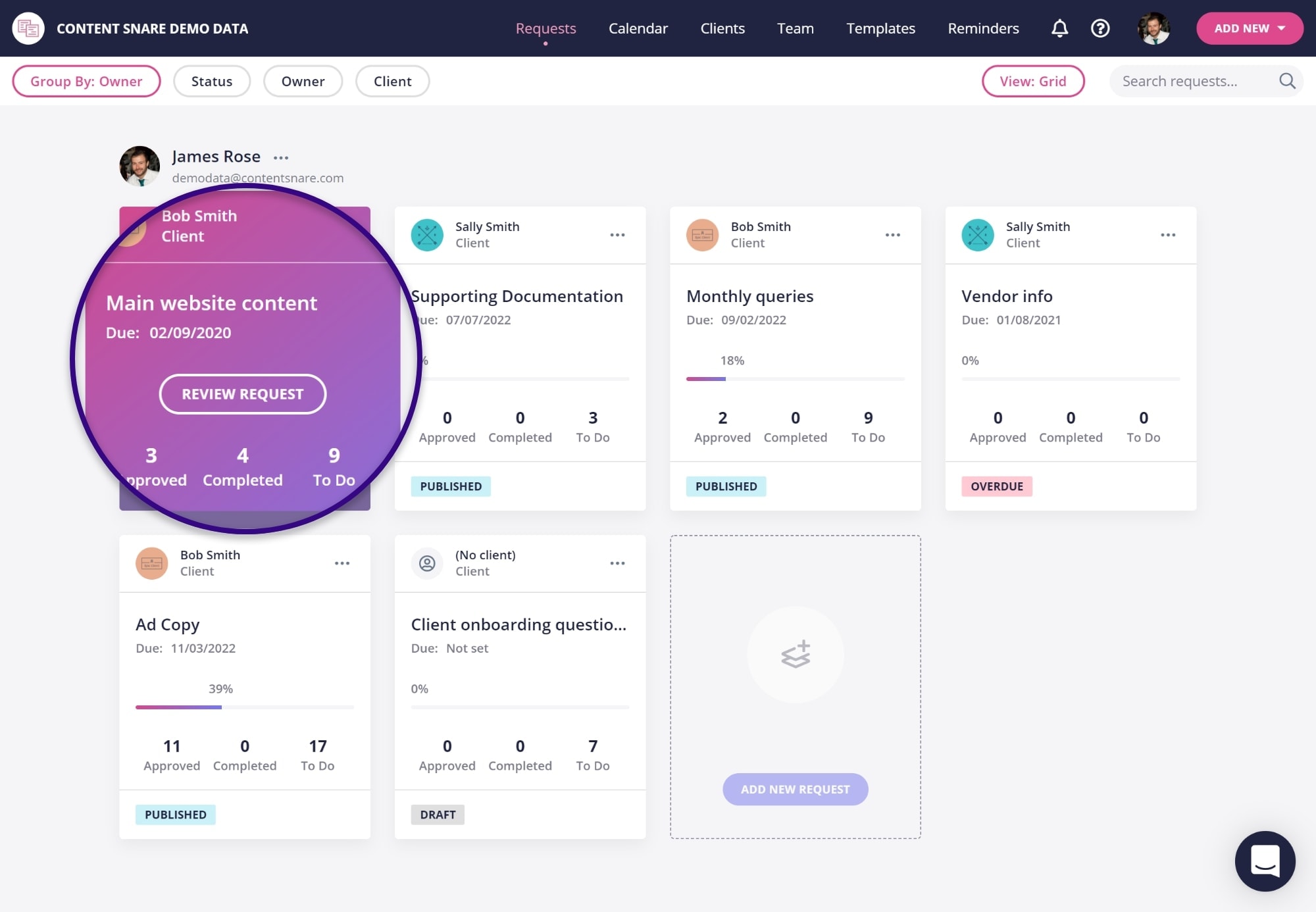
Set up as many email reminders as you like for each request.

Requests can include any number of questions or file uploads.

Save requests or sections as templates to use again later.

Set up as many email reminders as you like for each request.
Your clients get a link where they can access their request at any time from any device.

Approve questions or send them back for changes if needed.

Get started quickly without writing your own reminder emails..
Use Content Snare as part of a greater workflow.

No matter what kind of information you need from clients, Content Snare can help - it's not only for documentation. Use it for
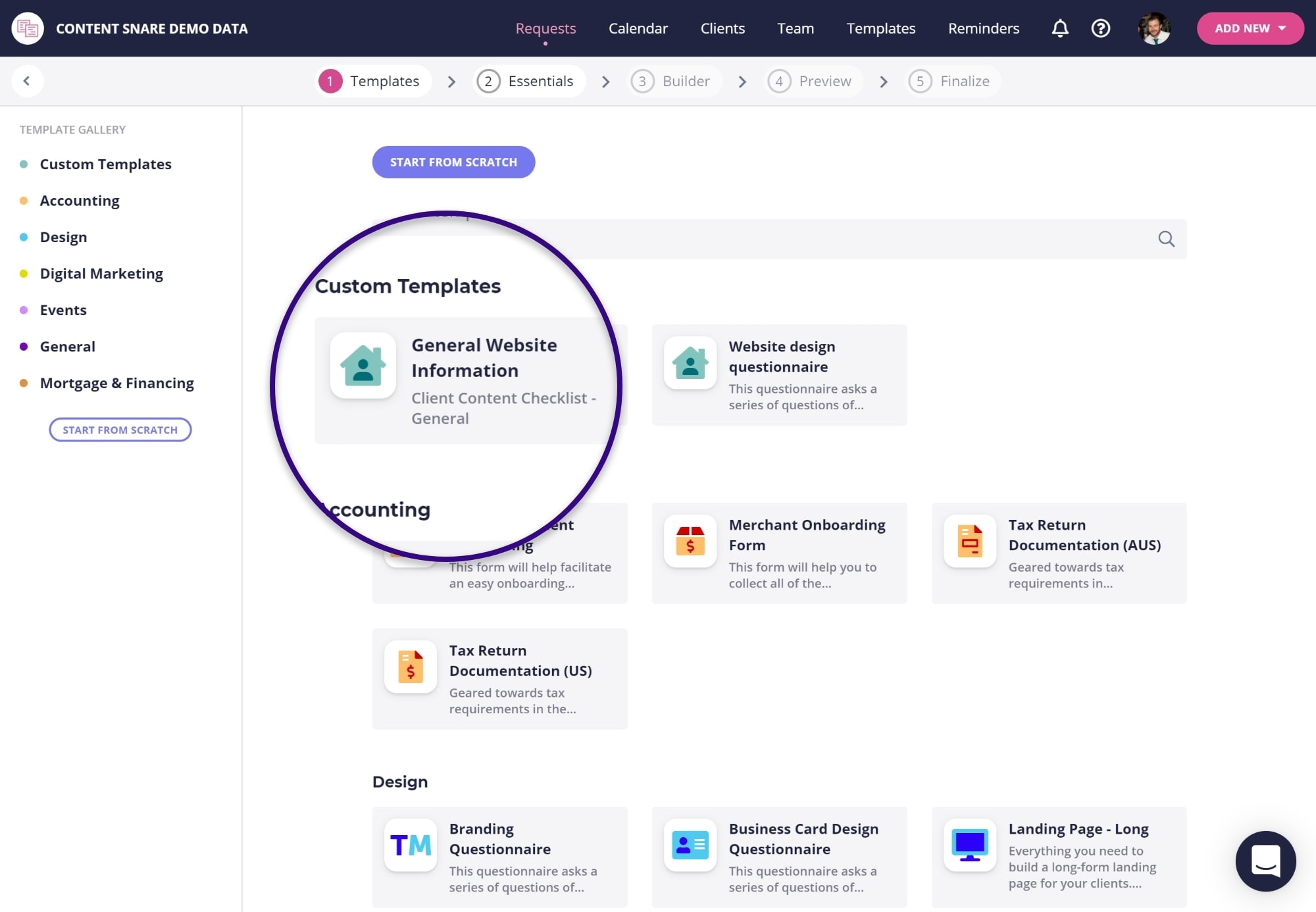
You'll find loads of templates in Content Snare ready to go.

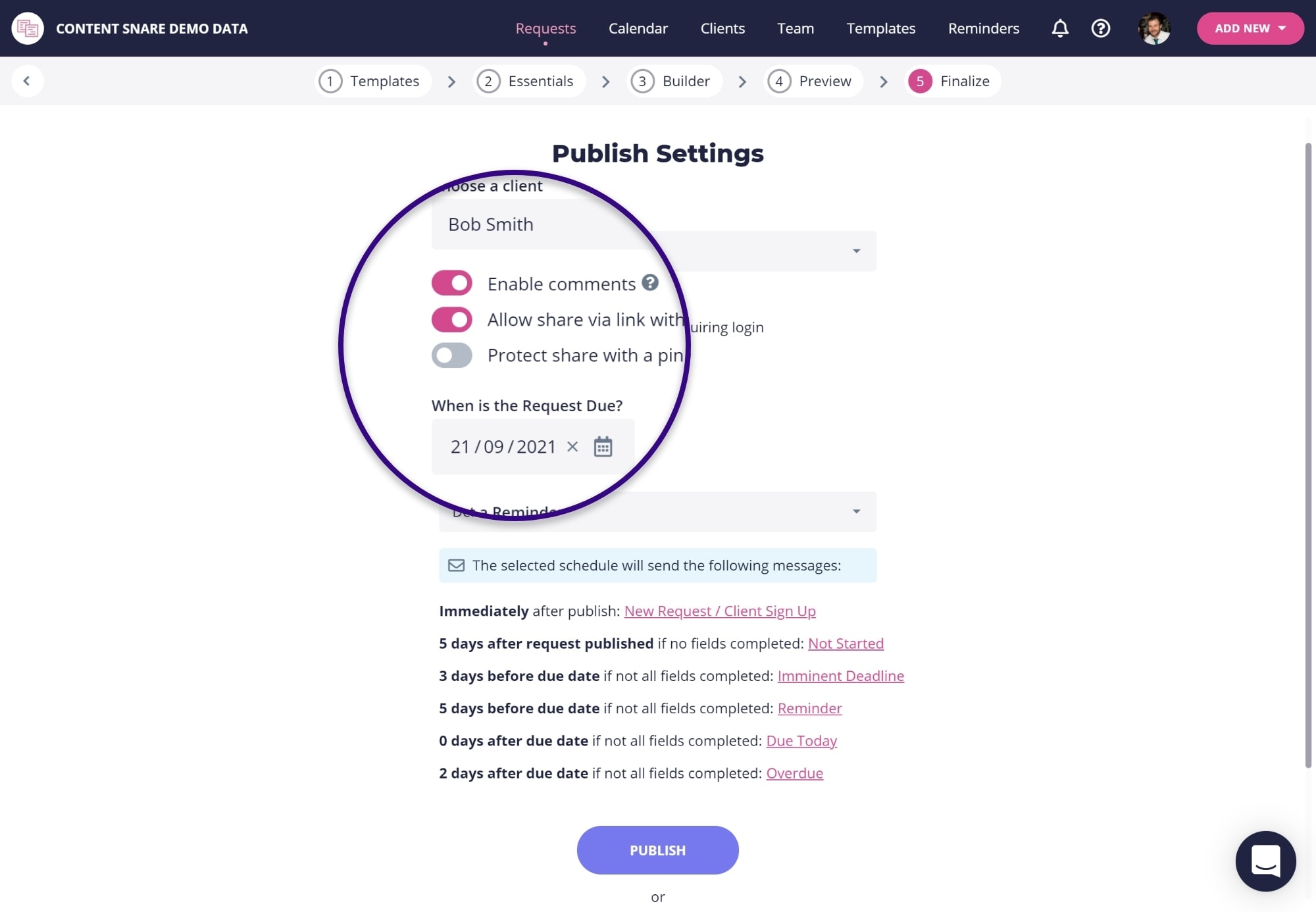
It sends automatic, periodic reminders to your clients to save your team time and sanity.
It creates a central place for all your client documents & information, meaning:
Once a document is approved by you, it's locked in to prevent changes. If they uploaded the wrong file or enter the wrong information, simply reject the item and your client will be prompted to come back and correct it.
Once they're finished, download all your client information in one click.
Set up each type of "information request" once and re-use them again and again.
Start with our templates, or create your own for client onboarding, monthly bank statements or end of year documentation.
It only takes a couple of clicks to send them to another client.
Better yet, you can automate the process with our integrations.


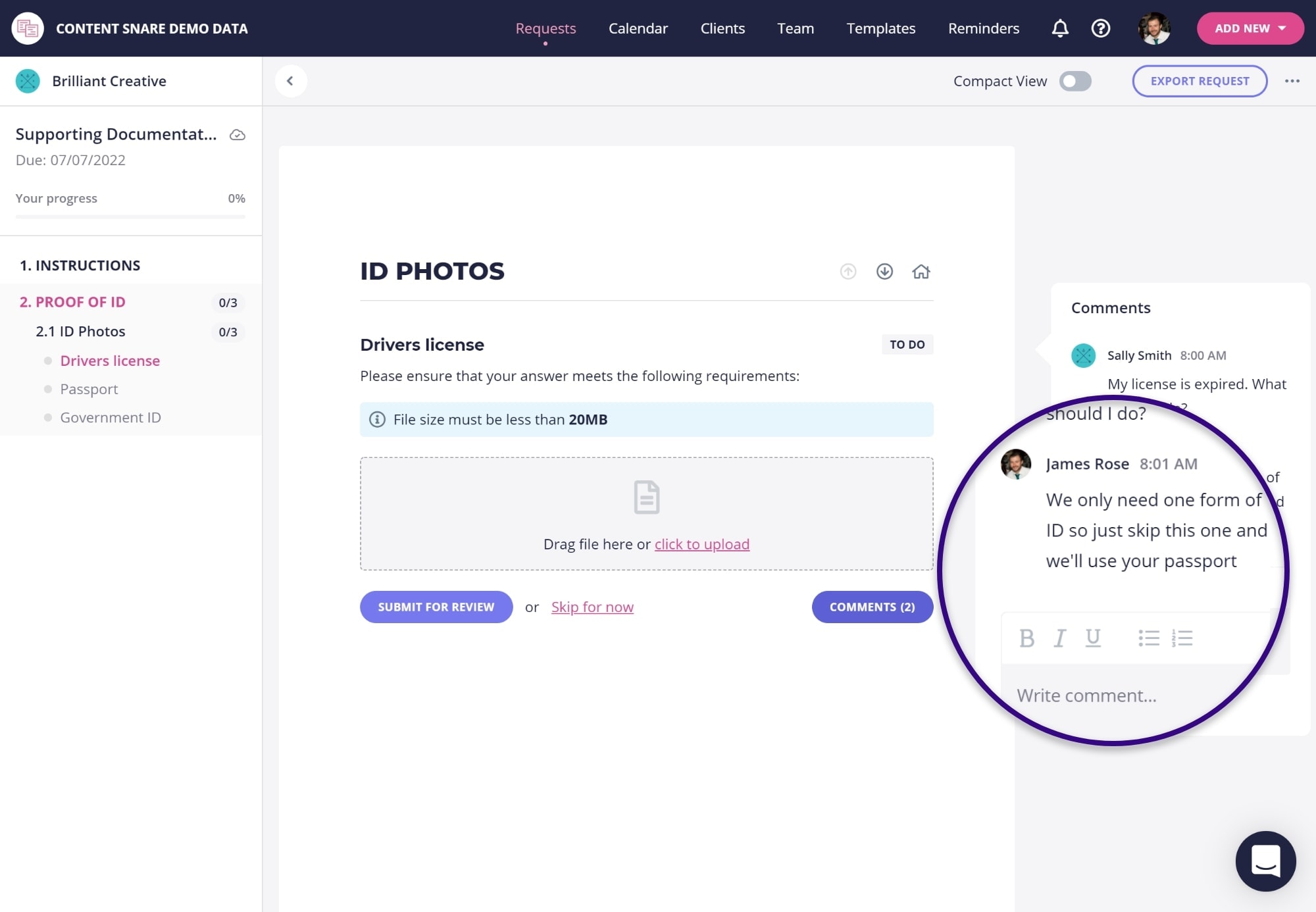
If your clients have questions, they can ask right there inside the platform.
This eliminates those neverending email trails full of questions, sporadic attachments and incorrect information.
If you're tired of chasing clients for information, give Content Snare a try today.
Click the button below to begin your free 14-day trial.
No. Content Snare is not practice management software. It doesn't replace Karbon, TaxDome, or Xero Practice Manager, and it's not trying to.
Those tools manage your jobs, deadlines, and team workflow. Content Snare is the client-facing portal where your clients actually send you things.
Where practice management falls short is the client experience. Clients forget to respond, send half of what you asked for, or email documents one at a time over weeks. Content Snare gives your firm a dedicated accounting client portal with automatic reminders, auto-save so clients can complete things over multiple sessions, and progress tracking so your team can see exactly what's outstanding at a glance.
Accounting & bookkeeping firms use Content Snare any time they need clients to answer questions, provide documents, or complete tasks. That includes tax return document requests, monthly or quarterly queries, regular reporting, tax planning, fringe benefits tax (FBT), Making Tax Digital (MTD), workpaper collection, compliance documentation, ID verification & AML screening.
If you need something from a client, you can use Content Snare to get it.
Content Snare works alongside the tools you already use, with integrations for Xero Practice Manager, FYI, SuiteFiles (via SharePoint), OneDrive, SharePoint, Dropbox, Google Drive, and 5,000+ apps via Zapier and Make.
We also have an API and webhooks which can be used to build custom integrations.
Content Snare is ISO 27001 certified, the international standard for information security management.
We go beyond what's expected, with military-grade encryption, unique encryption keys per firm, and all documents encrypted in transit and at rest. Infrastructure is hosted on AWS with network isolation, firewalls, and role-based access controls.
Sensitive financial documents stay out of email entirely.
Yes. Accounting firms use Content Snare to handle their entire onboarding process: ID verification and AML screening, signing engagement letters, ethical clearance, collecting entity details and prior year tax returns, client-agent linking (for Australian firms), and getting access to accounting systems.
Set up a template once and reuse it for every new client, with automatic reminders handling the follow-up.
This is the most common concern we hear. Content Snare has been used by thousands of firms since 2017 to collect documents from hundreds of thousands of clients. The answer is yes, they use it. The interface is simple and focused, clients don't need to create an account or install anything, and everything auto-saves so they never lose progress. We consistently hear that clients prefer it to email.
As Michael Carter said: "Our clients love it, our team members love it. We get new clients started so much faster and our team can hit the ground running knowing the information has been collected and checked. Everyone wins."
Because it's easy to set up, easy for your team to use, and most importantly, easy for your clients.
Many firms use Content Snare alongside their existing practice management tool, and we regularly have people switch to us from other platforms because their clients wouldn't use them or they were too complicated to set up.
As Cassandra Ferris put it: "Content Snare is so easy to use. It comes with a bunch of templates for our accounting practice that we've only had to slightly customise to suit our needs. Requesting information for tax compliance has never been so easy. And clients love it."
Yes. Content Snare gives your clients a secure, branded portal where they can upload documents, answer questions, and complete tasks at their own pace. Everything auto-saves, so they can come back and finish later. They don't need to create an account or install anything.
You can also send files back to clients securely through the portal, like tax returns, financial statements, and reports, keeping everything out of email.
You create a request using one of the built-in accounting templates (or build your own), add the questions and document uploads you need, and send it to your client.
They get a link to a secure portal where they work through each item at their own pace. Everything auto-saves, so they can close the browser and pick up where they left off.
If they don't finish, Content Snare sends automatic reminders on a schedule you set. You can see exactly what's been completed and what's still outstanding, approve or reject individual items, and download everything when it's done.