
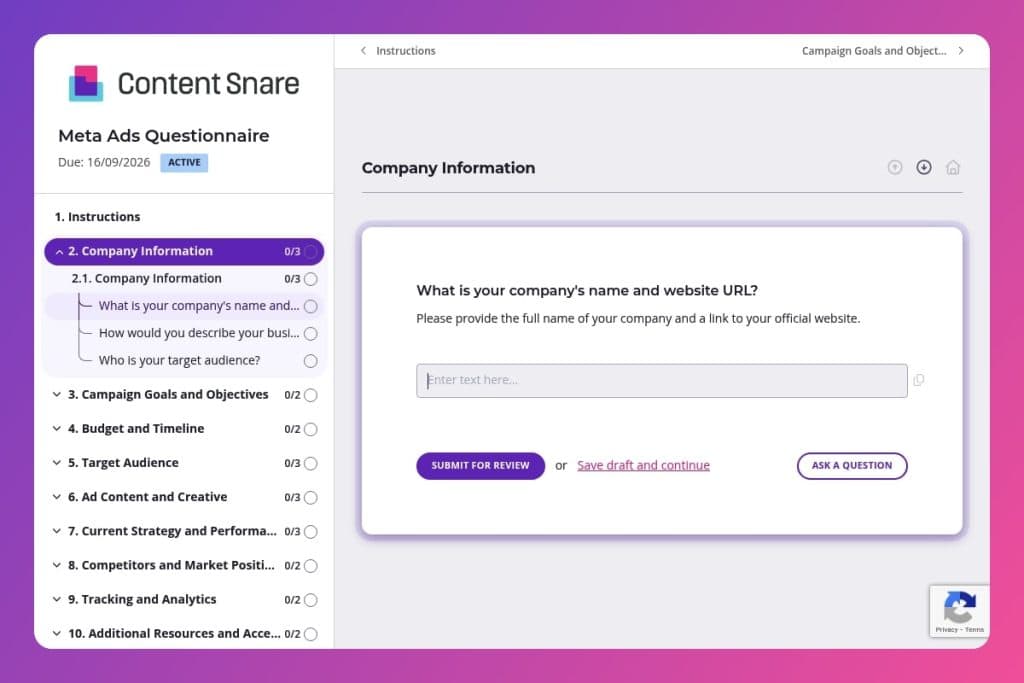


A structured intake form that collects campaign objectives, audience data, budget parameters, creative assets, tracking setup, and brand guidelines before launching Meta advertising campaigns.

Digital agencies running paid social campaigns for clients who need to gather complete information upfront - from pixel installation status to competitor positioning - without chasing details across email threads.

Send immediately after contract signing and before the kickoff call, so the discovery meeting focuses on strategy and campaign planning rather than collecting basic information.
Your client just approved a five-figure Meta ads budget, but you're missing half the information you need to launch. Chasing down creative assets, tracking pixels, and campaign objectives across endless email threads burns hours and delays results - time neither you nor your client can afford.
A meta ads questionnaire solves this. It's a structured intake form that captures everything upfront: goals, audience data, brand guidelines, budget parameters, and tracking setup. This post covers what questions to include, how to use the form in your client onboarding workflow, and a free template you can customize. Here's what you need to know.
Company Information
These basics anchor context, verify assets, and frame audience assumptions.
Campaign Goals and Objectives
Clarify what success means so optimization, creative, and reporting map to the same outcomes.
Budget and Timeline
Define constraints that drive bidding strategy, pacing, and launch planning.
Target Audience
Lock in who you need to reach to guide targeting, exclusions, and creative angles.
Ad Content and Creative
Confirm available assets and guardrails to streamline production and approvals.
Current Strategy and Performance
Surface learnings and channel overlap to avoid duplication and accelerate optimization.
Competitors and Market Positioning
Establish the competitive frame to craft differentiation and conquesting tactics.
Tracking and Analytics
Validate measurement readiness and alignment on success metrics.
Additional Resources and Access
Clarify ownership and risks to keep delivery unblocked.
Legal and Compliance
Identify constraints that could impact targeting, messaging, and review times.
Send it before the kickoff call, not after: Get the meta ads questionnaire to your client as soon as they sign the contract. Review their responses during your kickoff meeting instead of spending that time gathering basic information. This shifts the conversation from data collection to strategy - you'll discuss why they chose certain objectives or how their past campaigns inform this one, rather than scrambling to fill in blanks.
Flag the pixel question early: Most clients don't know if they have a Meta Pixel installed, and finding out later delays everything. When you send the form, add a quick note highlighting the tracking and analytics section. If they're unsure, offer to audit their site before the campaign starts. This single proactive step prevents week-long delays when you're ready to launch.
Use incomplete responses as a discovery tool: If a client skips the competitor analysis questions or leaves campaign goals vague, that's valuable information. It tells you where they need guidance. Schedule a 15-minute follow-up focused specifically on those gaps - you'll position yourself as a strategic partner, not just an order-taker, and get the clarity you need to build campaigns that actually perform.

The tracking and analytics section trips up clients every time. Most don't know what a Meta Pixel is, let alone whether they have one installed. Add a brief instruction above that question: "This is a tracking code on your website - if you're unsure, ask your web developer or we can check for you." Same goes for budget questions. Specify whether you're asking for monthly spend, total campaign budget, or ad spend only. Clear instructions mean fewer follow-up messages and faster turnaround.
You likely have basic company information, website URLs, and contact details from your sales process or contract. Delete those questions or pre-fill them before sending the form. Your client sees a shorter questionnaire that respects their time, and you signal that you've actually paid attention. This works especially well for the company information and main point of contact sections - skip the busywork and get straight to the strategy questions that matter.
A single scrolling list of 20+ questions feels overwhelming. Split your meta ads questionnaire into clear sections: Company Background, Campaign Strategy, Creative Assets, and Technical Setup. Each page feels manageable, and clients can complete it in stages if needed. This structure also mirrors how you'll actually use the information - background first, then strategy, then execution details.
The ad content section asks about existing creatives and brand guidelines. Enable file uploads so clients can attach their brand kit, logo files, previous ad examples, or competitor ads they admire. Add a text instruction: "Upload 2-3 examples of ads you love (yours or competitors') so we understand your vision." Visual references prevent misalignment and give you a head start on creative direction.
Email threads and Google Forms don't cut it when you're managing multiple client campaigns. Content Snare keeps everything organized in one place, automatically follows up when clients go silent, and lets you track exactly what's missing. You look more professional, clients have a smoother experience, and nothing falls through the cracks.
This meta ads questionnaire is just one use case. Digital agencies use Content Snare for SEO audits, website project briefs, content calendars, social media intake forms, and monthly reporting requests. Anywhere you need information from clients, Content Snare handles it better than email.
Content Snare is trusted by thousands of agencies worldwide and has hundreds of 5-star reviews across G2, Capterra, and Trustpilot. It's ISO 27001 certified, so client data stays secure - critical when you're collecting business information, competitor insights, and ad account access details.
The platform integrates with tools you already use: your CRM, project management software, and cloud storage. No manual data entry or copying responses between systems. Set it up once, then replicate the workflow for every new Meta ads client you onboard.


