


A pre-consultation intake form that collects complete client information including case details, court deadlines, community involvement, financial considerations, and documentation before the first meeting.

Community law practitioners, legal aid organizations, and solo attorneys serving local clients who need to gather comprehensive case information while identifying available community resources and funding options.

Send 24-48 hours before initial consultations to allow clients time to gather documentation, verify court dates, and provide thorough case details so attorneys can arrive prepared with case fundamentals already understood.
Intake calls often miss critical details that surface only after representation begins. Clients forget to mention court dates. Lawyers miss community resources that could reduce costs. Critical documentation never makes it to the first meeting.
A community law questionnaire solves this before it starts. You capture complete client information upfront - case details, deadlines, community involvement, and financial considerations - in one organized form. This post covers what makes an effective community law questionnaire, how to use it strategically in your practice, and a free template you can customize immediately. Here's what you need to know.
Client Information
Start with the basics you need to open the file and reach the client.
Community Engagement
These questions show how connected the client is to their community and whether that connection bears on the matter.
Leadership roles and existing legal engagement can point to conflicts of interest, group-based claims, or a wider community stake in the outcome.
Legal Services Required
Pin down what the client wants from you and how soon.
Deadlines and court dates set your triage order, and stated objectives give you a baseline to manage expectations against.
Case Details
Collect the facts of the matter before the first conversation.
The list of parties feeds your conflict check, and earlier resolution attempts show what has already been tried.
Financial Information
Understand the client's budget and funding options early.
Expectations and Preferences
Capture how the client expects the matter to run so you can set the working arrangement up front.
Confidentiality and Consent
Record any confidentiality concerns and the client's position on sharing information.
The second question gives you consent to brief barristers, experts or referral partners without stopping to ask later.
Additional Information
Leave room for anything the earlier sections missed.
Send it before the initial consultation: Give clients 24-48 hours to complete the questionnaire before your first meeting. They'll have time to gather documentation, check court dates, and think through their objectives without the pressure of a face-to-face conversation. You'll arrive at the consultation already knowing the case fundamentals.
Flag the financial and community resources section upfront: Many clients don't realize community legal aid, pro bono programs, or local funding might be available. When you send the form, include a brief note drawing attention to these questions. You might uncover cost-relief options that make representation possible for clients who'd otherwise walk away.
Use their community involvement answers strategically: The community engagement section isn't just background - it reveals credibility, local connections, and potential character witnesses. If a client lists leadership roles or active community participation, note this early. It can strengthen certain cases and inform your overall strategy.
Create a pre-submission checklist for documentation: Don't just ask "Do you have documentation?" Tell clients exactly what to gather: contracts, correspondence, photos, police reports, previous legal filings. Attach a simple checklist when you send the form. You'll get complete case files from the start instead of chasing papers for weeks.
Review confidentiality concerns immediately after submission: If a client flags confidentiality issues or expresses hesitation about discussing their case with other professionals, address this in your first response. These concerns can delay critical collaboration with experts or co-counsel if left unresolved.
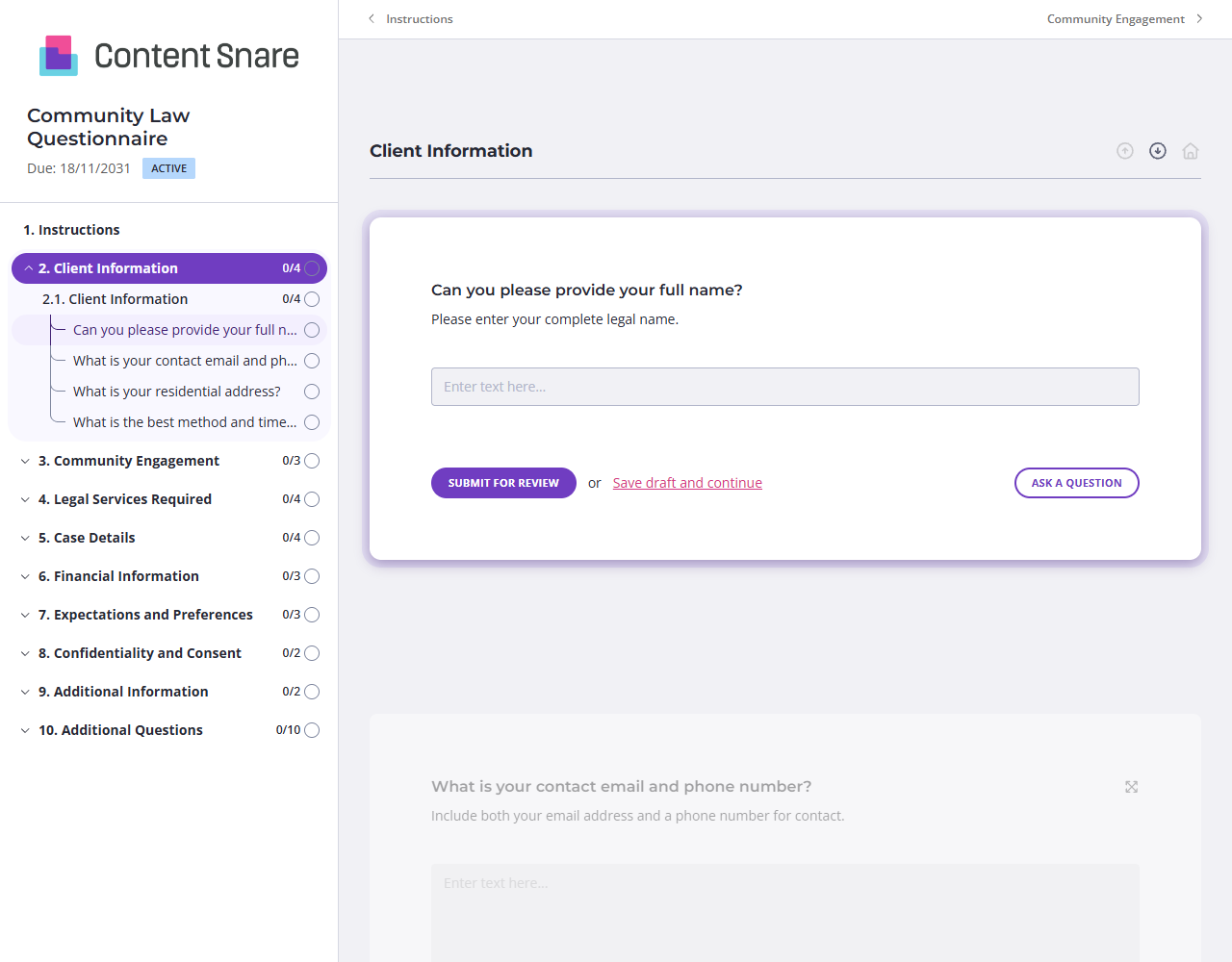
Community law cases involve sensitive details across multiple areas - personal information, case specifics, financial situations, and confidentiality concerns. Clients get overwhelmed when they see 30+ questions at once.
Split your questionnaire into logical pages: Client Details, Legal Matter, Financial Considerations, and Final Questions. Clients tackle one section at a time, and you reduce abandonment rates. They can save progress and return later without losing work - crucial when someone needs to dig up documentation or check court dates mid-form.
The "case description" and "documentation" questions trip people up. Clients either write novels or single sentences, neither of which helps you assess the case properly.
Use instruction areas to guide them. Under case descriptions, tell them exactly what you need: "Describe the key events in chronological order. Include dates, locations, and people involved. Aim for 3-5 paragraphs." For documentation requests, list specific examples: "rental agreements, text message screenshots, medical reports, police incident numbers."
You'll get usable information the first time instead of going back and forth.
You've likely collected basic details before sending the questionnaire - name, email, phone number from an inquiry form or initial call.
Delete those questions or pre-fill the answers before you send. Clients appreciate not repeating themselves, and you shorten their completion time. It's a small touch that shows you're organized and respectful of their time - important when building trust with vulnerable community members.
Clients dealing with legal stress forget to complete forms. You don't want to nag, but you need that information to move forward.
Configure automatic reminders that go out after 3 days, then 7 days. The system plays the bad guy while you stay focused on casework. Phrase reminders empathetically: "We know you're dealing with a lot right now. Just a gentle reminder to complete your intake questionnaire when you have a moment." You'll close more intakes without awkward follow-up calls.
Email attachments get lost. Google Forms look amateur. Phone intake wastes billable hours and misses details. Content Snare gives you a professional, secure system that clients actually complete - with automatic follow-ups, progress tracking, and all responses organized in one place. It's ISO 27001 certified and trusted by legal professionals handling sensitive client information.
Why legal practices choose Content Snare:
Client trust matters. Branded forms (not a generic survey tool) signal professionalism. Clients see your logo, your colors, your messaging - critical when handling sensitive legal matters.
Security isn't optional. Community law involves vulnerable populations and confidential information. Content Snare's enterprise-grade security protects client data without you thinking about it.
You get completed forms. Automatic reminders mean you're not chasing clients. Progress tracking shows who's stuck. Save-and-resume functionality helps clients complete forms around their schedules - not just when they have 20 uninterrupted minutes.
It integrates with your workflow. Sync files to cloud storage like Google Drive, Dropbox, OneDrive and SharePoint, or connect other apps through Zapier, Make or the API.
Thousands of businesses worldwide rely on Content Snare, with hundreds of 5-star reviews across G2, Capterra, and Trustpilot.
Beyond intake questionnaires, legal practices use Content Snare for estate planning documentation, client onboarding packets, witness statement collection, settlement agreement reviews, and annual compliance updates. Any time you need information from clients, Content Snare handles it better than email threads and attached PDFs.


