


A comprehensive intake form that collects client personal details, case specifics, opposing party information, deadlines, financial arrangements, and conflict check data before the first consultation.

Law firms and solo practitioners who need to streamline client onboarding, conduct early conflict screenings, and gather complete case information before investing time in consultations.

Send it immediately after a prospective client expresses interest in representation, ideally 24-48 hours before the initial consultation, to arrive prepared and identify any urgent deadlines or conflicts.
Missing a critical deadline because intake paperwork was incomplete? It happens more often than it should. Potential clients reach out in distress, but gathering the right information upfront often becomes a scattered process - emails back and forth, forgotten details, and wasted billable hours piecing together basic facts.
A legal representation questionnaire solves this. It captures everything you need in one organized form: client details, case history, opposing party information, conflict checks, and communication preferences. You'll learn how this form works, best practices for implementation, and access a free template you can customize immediately. Let's break it down.
Personal Information
Start with the identity and contact details you need to open the file and reach the client.
Legal Matter Details
These questions scope the matter and show you what the client wants out of it.
Deadlines and ongoing proceedings tell you how urgent the matter is and whether another court or tribunal is already involved. The goals question shows early whether the client's expectations match what you can deliver.
Opposing Party Information
Collect who is on the other side and how the client knows them.
Case History
This group covers what has already happened, so you don't repeat work or miss an existing order.
Existing judgments, orders and past negotiations can limit your options or shape your strategy. Getting the documents up front saves a round of follow-up requests.
Financial Information
Find out how the client expects to pay before you commit to the engagement.
Communication Preferences
Record how and when the client wants to hear from you.
Conflict of Interest
Use these answers to run your conflict check before you take the matter further.
Current representation and prior contact with your firm affect whether you can act at all. Check these answers against the opposing party details from earlier in the form.
Additional Information
Leave room for anything the earlier sections didn't capture.
Send the form before the initial consultation: Give clients 24-48 hours to complete it in advance. You'll arrive at the first meeting already informed about their legal issue, deadlines, and case history - turning what would've been a fact-finding session into a strategic conversation about next steps.
Flag urgent matters immediately: Train your intake team to review responses as they come in, specifically checking the "deadlines or critical dates" and "ongoing legal proceedings" fields. A statute of limitations doesn't wait for your standard response time.
Use the opposing party section to run early conflict checks: The moment you know who's involved and their relationship to your client, you can screen for conflicts before investing time in case evaluation. It's much easier to decline representation on day one than after you've reviewed documents.
Request supporting documents upfront: When clients mention prior legal advice, existing judgments, or relevant contracts in their responses, immediately follow up asking them to upload or email those files. You need the full picture, not just their interpretation of it.
Review financial information realistically: If a client indicates financial constraints or unclear funding plans, address fee structures and payment options early in your first conversation. Misaligned expectations about costs derail cases faster than almost anything else.
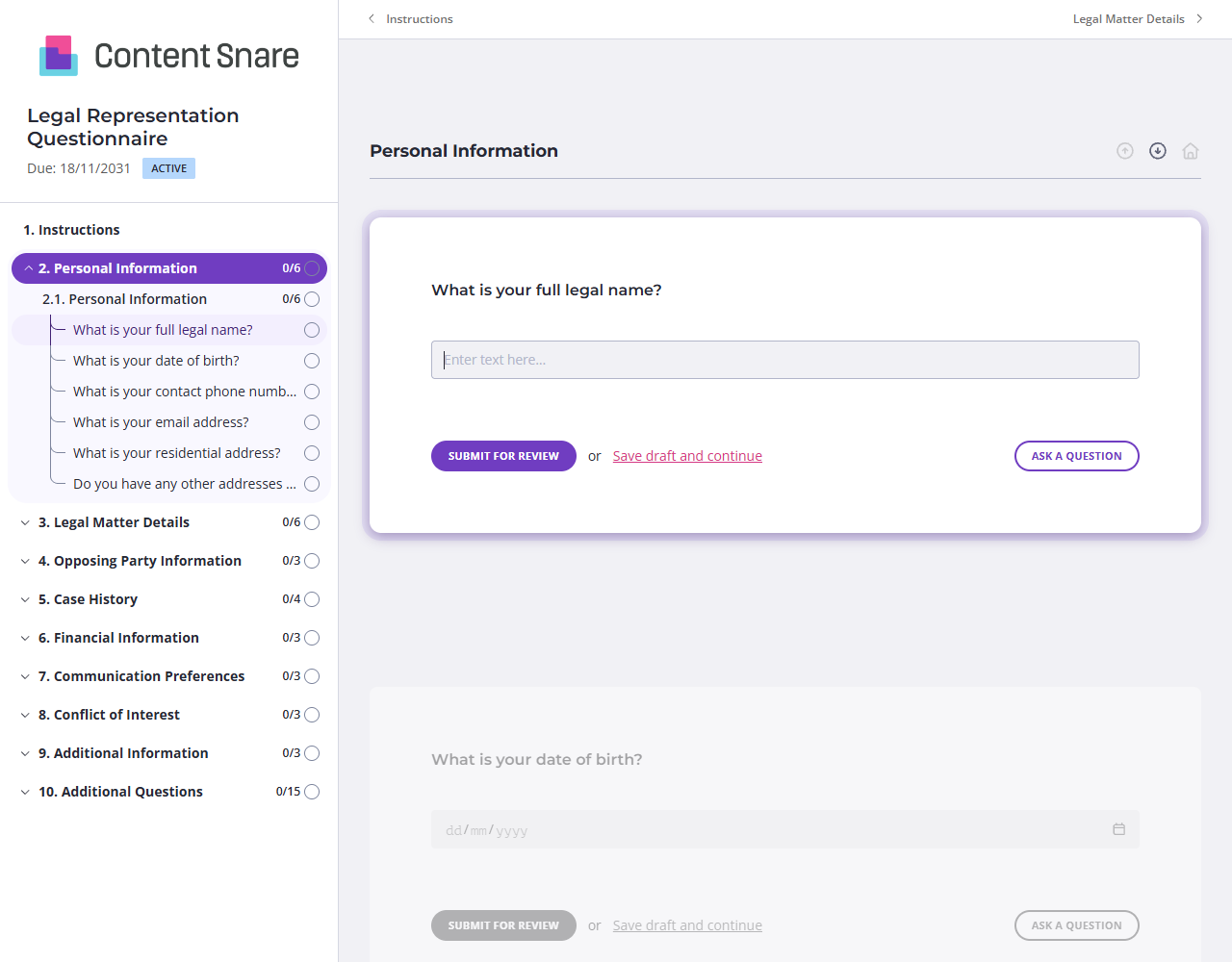
Your legal representation questionnaire covers everything from personal injury to corporate disputes. Conditional logic ensures clients only see questions that apply to their situation. When someone selects "family law" as their legal matter type, they won't waste time scrolling past questions about business contracts or opposing entities. The form adapts in real-time, making the experience faster and less overwhelming during what's already a stressful time for your client.
Legal intake can feel like an interrogation if you present 30+ questions on a single page. Content Snare lets you organize questions into clear sections - Personal Information, Legal Matter Details, Case History, Financial Information - with each section on its own page. Clients move through one focused topic at a time, which reduces abandonment and improves completion rates. They can also save progress and return later if they need to gather documents or verify dates.
You've likely collected basic contact details during the initial phone call or through your website's contact form. Pre-fill those fields - name, email, phone number - before sending the questionnaire. Clients appreciate not having to repeat themselves, and you avoid the frustration of receiving forms with mismatched or updated information. Delete any questions that don't apply to the specific case type, too. A streamlined form shows you've already invested attention in their matter.
Clients have every intention of completing your intake form, but life gets in the way. Automatic reminders handle follow-up without you lifting a finger or feeling like you're nagging. You can schedule gentle nudges at intervals that make sense - maybe 2 days after sending, then again at 5 days. This is especially critical when deadlines are involved. That statute of limitations field means nothing if the form sits incomplete in someone's inbox for three weeks.
Email threads lose attachments. Word documents come back with formatting disasters. PDFs get printed, filled out by hand, and scanned at angles that make them barely readable. Content Snare eliminates the chaos with a purpose-built platform for collecting client information - organized, trackable, and ISO 27001 certified for the security your practice demands.
You get automatic follow-ups so intake doesn't stall. Clients work through a clean, branded experience instead of wrestling with clunky file formats. Everything lands in one place, ready to review or export to your case management system.
Content Snare is trusted by legal professionals and used by thousands of businesses worldwide, with hundreds of 5-star reviews across G2, Capterra, and Trustpilot. Files can sync to Google Drive, Dropbox, OneDrive or SharePoint, and Zapier, Make and the API connect Content Snare to your other tools.
This legal representation questionnaire is just the starting point. Law firms use Content Snare for:
Each form is fully customizable, so you build exactly what your practice needs.


