


A structured intake form that captures jurisdiction, constitutional provisions, case timelines, prior proceedings, and supporting evidence for constitutional law matters.

Constitutional law attorneys, civil rights lawyers, and legal firms handling First Amendment, due process, or other constitutional claims who need comprehensive client information upfront.

At initial client intake before case evaluation, especially when constitutional issues involve multiple parties, prior proceedings, or time-sensitive violations requiring immediate documentation.
Your client mentions a potential First Amendment violation, but the facts are scattered across three emails, a phone call summary, and a hastily scribbled note from intake. You're missing the jurisdiction, unclear on prior counsel, and you haven't confirmed which constitutional provisions actually apply. A constitutional law questionnaire solves this chaos by capturing every critical detail upfront - jurisdiction, relevant provisions, timelines, prior proceedings, and supporting evidence - in one structured document.
This post walks you through what a constitutional law questionnaire should include, how to use it effectively during client intake, and gives you a free template to customize for your practice. You'll save hours of follow-up calls, reduce the risk of overlooking key facts, and build stronger cases from day one. Let's dig in.
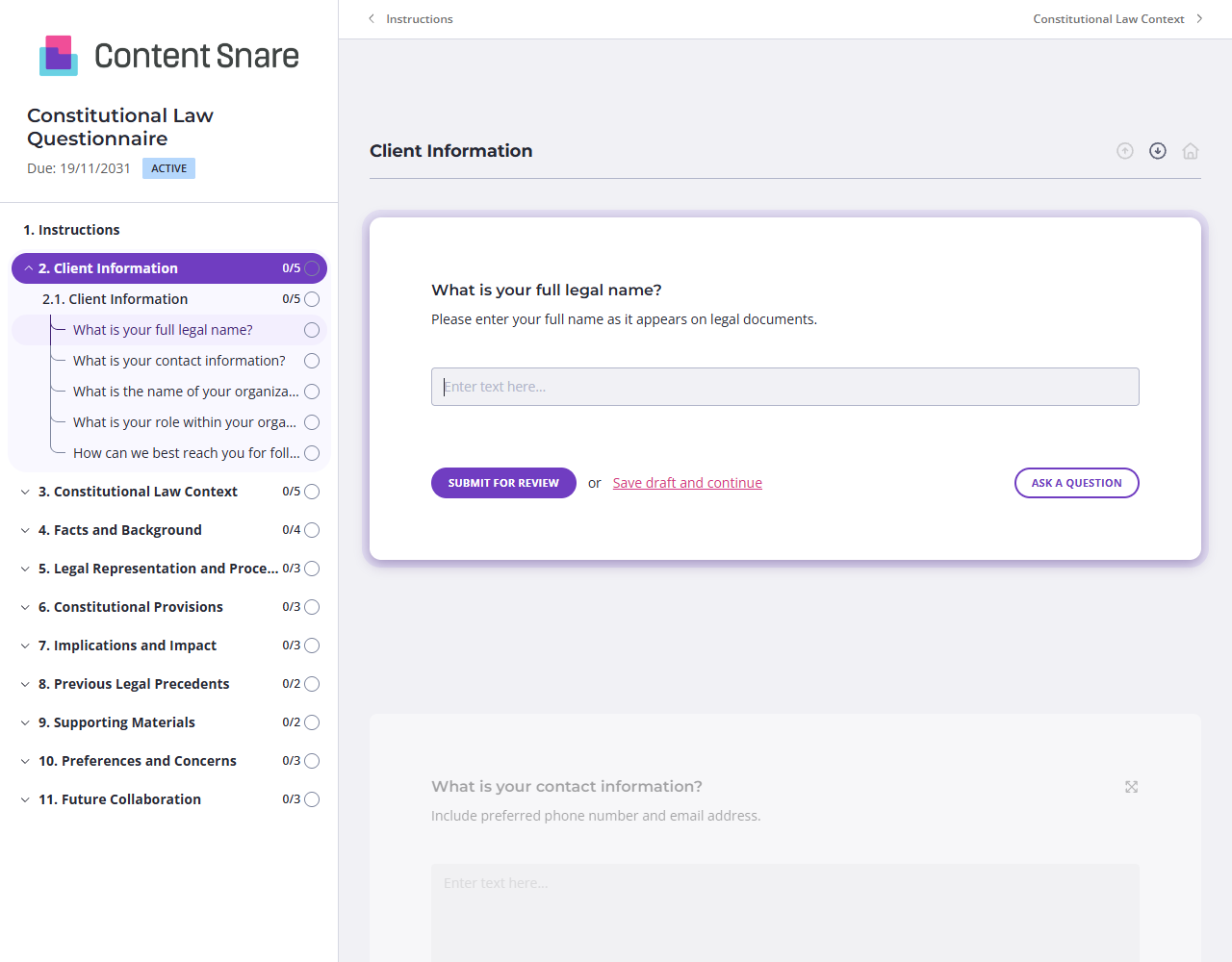
Client Information
Start with the basics you need to identify the client and reach them quickly.
Constitutional Law Context
These questions frame the matter so you can judge scope, jurisdiction and fit before a first call.
The jurisdiction and goal questions set which constitutional framework applies and what a successful result looks like for the client.
Facts and Background
Collect the factual narrative and timeline so you can see how the dispute developed.
Legal Representation and Proceedings
Confirm whether anyone else is acting and whether proceedings are already underway.
Representation and proceedings status affects conflicts, timing and whether you are taking over or starting fresh.
Constitutional Provisions
Capture the client's view of the provisions in play, which gives you a starting point to test against your own analysis.
Implications and Impact
Understand what the matter means for the client beyond the legal question.
Previous Legal Precedents
Find out which authorities the client already knows about and how they think those authorities apply.
Supporting Materials
Get documents and correspondence in one place from the start.
Preferences and Concerns
Record how the client wants the matter handled and any constraints on timing or disclosure.
The deadlines question catches limitation periods and hearing dates early, before they limit your options.
Future Collaboration
Close by checking next steps and the client's appetite for ongoing contact.
Pre-populate jurisdiction and basic case context when possible: If you already know the client is dealing with a Fifth Amendment claim in federal court, fill in those fields before sending the form. This shows you've been listening, saves your client time, and lets them focus on providing the nuanced details - like specific timelines, supporting evidence, and how the issue impacts their organization - rather than retyping information you already have.
Use the "Previous Legal Precedents" section as a conversation starter, not a test: Most clients won't know every relevant case name or how precedents apply to their situation. Frame these questions as optional or exploratory - you're gauging their level of legal knowledge and uncovering any research they've already done. Their answers (or lack thereof) tell you how much groundwork you'll need to lay and whether they've been influenced by media coverage or prior counsel's framing.
Follow up on vague answers in the "Facts and Background" section immediately: If a client writes "constitutional rights violated" without specifics, or lists "various parties involved" without names, don't let it sit. Schedule a brief call within 24 hours to clarify before you start your legal analysis. The quality of your intake directly impacts case strategy, and catching gaps early prevents costly backtracking later.
Constitutional cases vary wildly - a free speech claim looks nothing like a due process challenge. Set up conditional logic so clients only see questions that match their specific issue. If they select "First Amendment" as their constitutional provision, show fields for speech restrictions or religious freedom. If they indicate no prior legal proceedings, hide questions about case numbers and docket information. You'll get cleaner responses and avoid overwhelming clients with irrelevant fields.
Clients often struggle with questions like "Which constitutional provisions do you believe are relevant to your case?" or "Are there any notable legal precedents that may influence this case?" Use the instructions feature to clarify what you're asking without making it feel like a pop quiz. A simple note - "Not sure? That's okay. Just describe the issue in your own words and we'll identify the relevant provisions together" - reduces anxiety and gets you better information than a blank field or a wild guess.
Constitutional cases often involve tight deadlines - pending hearings, statute of limitations concerns, or ongoing violations. Automatic reminders ensure clients complete the questionnaire without you having to chase them down. This is especially valuable for the "Facts and Background" and "Supporting Materials" sections, where delays in receiving documentation can derail your case preparation. Your clients stay on track, and you maintain the professional boundary without playing the role of nag.
Email attachments get lost. Google Forms lack the structure constitutional cases demand. Phone intake means transcribing notes and inevitably missing details. Content Snare gives you a purpose-built client intake system that's secure enough for sensitive legal matters (ISO 27001 certified), organized enough to handle complex constitutional questions, and professional enough to reflect your firm's standards.
You're not chasing clients for information. They're not confused about what you need. Everything lives in one place, and you can track exactly what's been submitted and what's still outstanding. It's trusted by legal professionals and used by thousands of businesses worldwide, with hundreds of 5-star reviews across G2, Capterra, and Trustpilot.
Beyond constitutional law questionnaires, legal professionals use Content Snare for client onboarding forms, discovery document collection, estate planning intakes, contract review requests, and compliance questionnaires. Anywhere you need structured information from clients - especially when it involves sensitive details, tight deadlines, or complex documentation - Content Snare handles it without the back-and-forth chaos.


