


A pre-consultation intake form that collects essential dispute information including parties involved, dispute history, desired outcomes, prior legal attempts, available documentation, and budget considerations before the first meeting.

Attorneys, mediators, and legal practices handling disputes who need to streamline client intake, assess case viability, perform conflict checks, and prepare strategic recommendations before initial consultations.

Send immediately when a potential client contacts you about a dispute, before scheduling or conducting the initial consultation, so you can review case details and supporting documents in advance.
Your client calls with a dispute. Five minutes into the conversation, you're still gathering basic facts - missing key details, asking follow-up questions, and wasting billable time on information that could've been collected upfront.
A dispute resolution questionnaire changes that. It captures essential information - dispute history, involved parties, desired outcomes, prior legal attempts, and supporting documentation - before your first meeting. You'll spend less time on intake and more time on strategy. This post covers what a dispute resolution questionnaire should include, how to use it effectively in your practice, and gives you a free template to get started. Let's break it down.
Contact Information
Capture the basics first so you can reach the client in the way they prefer.
Client Background
Check whether you already have a relationship and whether the client has dispute history.
Prior disputes show how the client has handled conflict before and can affect how you approach strategy and settlement.
Dispute Details
This group gives you the facts of the matter and where it currently stands.
The question on legal proceedings flags filing deadlines and procedural constraints early. The question on past resolution attempts tells you what has already failed.
Desired Outcome
Find out what the client wants and how flexible they are.
Documentation
Know what evidence exists before you commit to a plan.
Legal Representation
Confirm whether anyone else is advising or acting for the client.
Current representation can create a conflict or stop you from taking the matter on, so you want the answer before any work starts.
Financial Considerations
Set expectations on budget and cost before the engagement begins.
Additional Information
Leave room for anything the earlier questions missed.
Send it before the initial consultation: Get the dispute resolution questionnaire to potential clients as soon as they reach out. You'll review their responses before the call, identify red flags or case strengths immediately, and use that first conversation for strategic discussion instead of basic fact-finding.
Ask for documentation upfront in the questionnaire: The form specifically requests what evidence clients have available. Push them to attach key documents - contracts, emails, correspondence - with their submission. You'll assess case viability faster and avoid the back-and-forth of requesting materials later.
Use the "previous disputes" section to spot patterns: Clients who've been involved in multiple legal disputes may have unrealistic expectations, communication issues, or legitimate concerns about recurring problems. This question gives you early insight into whether you're dealing with a one-time issue or a potential pattern that affects your strategy.
Pay close attention to their desired outcome: The gap between what clients want and what's legally achievable often determines case success. If someone wants "to make them pay" versus "fair compensation for documented losses," you'll know immediately how much client education and expectation management you'll need to do.
Follow up on incomplete answers with specific questions: When clients provide vague responses - especially around dispute timeline, prior resolution attempts, or other legal representation - don't let it slide. Send a quick follow-up asking for specifics. Incomplete information here can derail your entire case assessment and conflict check process.
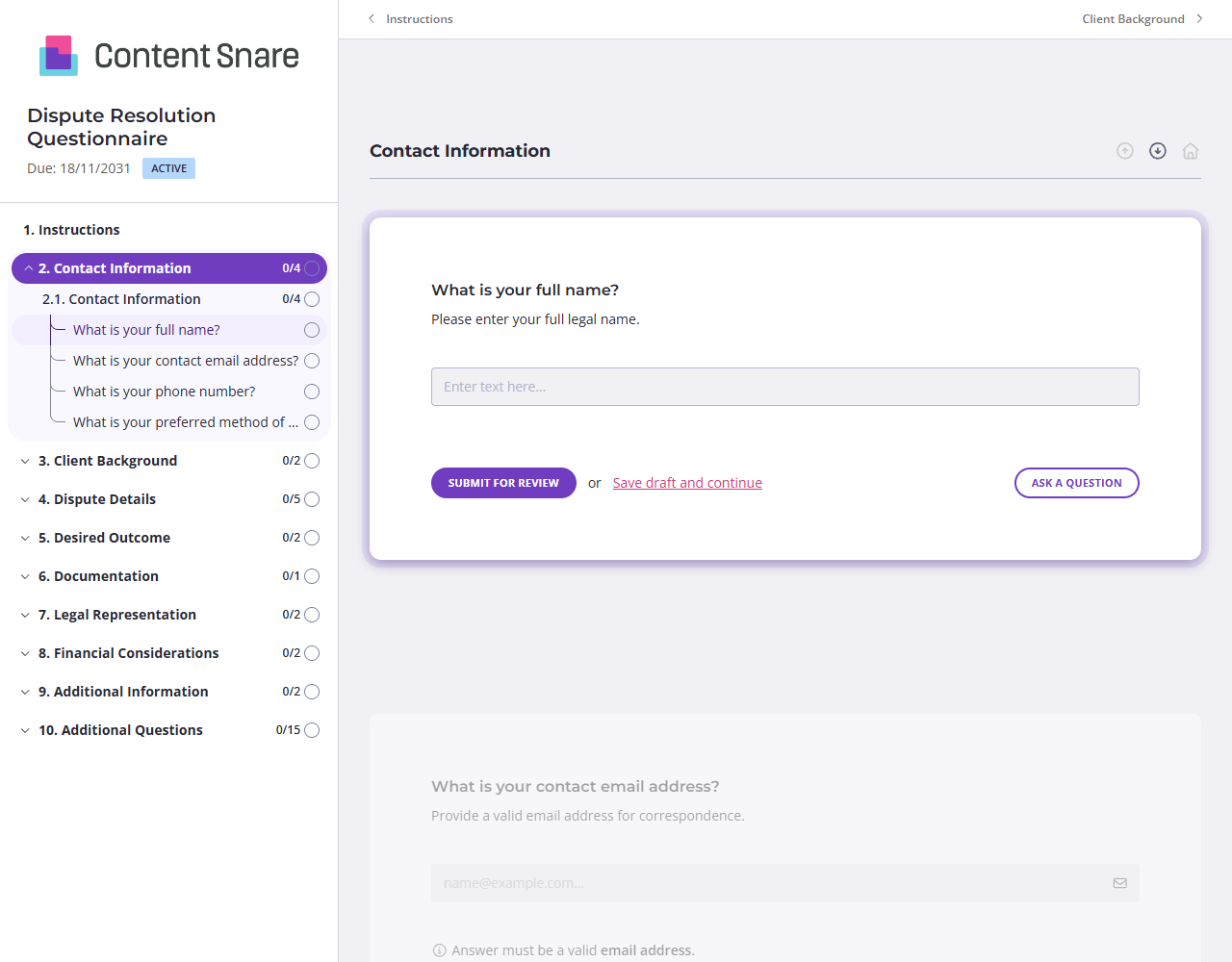
Dispute intake covers a lot of ground - contact details, case history, financial considerations, documentation. Content Snare lets you organize questions into clear pages and sections that match how you think about cases. Group "Dispute Details" separately from "Legal Representation" and "Desired Outcome." Clients can focus on one topic at a time instead of facing a wall of questions. They're more likely to complete the form, and you'll get more thoughtful responses.
Your form asks "Have you previously been involved in any legal disputes?" and then requests details about those disputes. Conditional logic hides the follow-up questions unless clients answer "yes." Same goes for prior legal representation or initiated proceedings. Clients only see what applies to their situation. The form feels shorter and more personalized, and you avoid the "N/A" responses that clutter your intake data.
The documentation section asks clients to list available evidence. Most won't know what you actually need. Add a text block above those questions with examples: "contracts, email threads, photographs, invoices, text message screenshots, witness statements." You can even include a quick video explaining what makes strong supporting documentation. Clients submit the right materials from the start, and you spend less time requesting clarification or additional files.
Returning clients shouldn't re-enter their name, contact details, and case history every time. Content Snare lets you prefill known information before sending the questionnaire. Better yet, delete those basic questions entirely and jump straight to the new dispute details. Your clients save time, and you signal that you already know their background - which builds confidence in your relationship.
Email chains and Word documents create chaos. Clients forget to answer questions, attach the wrong files, or send information in scattered messages over days. Content Snare keeps everything organized in one place with automatic reminders, clear instructions, and a professional client experience. You get complete, structured information without the follow-up headaches.
Security matters in legal work. Content Snare is ISO 27001 certified and trusted by law firms and legal professionals worldwide. Your client data stays protected, and you maintain the confidentiality standards your practice requires.
The platform syncs files to cloud storage like Google Drive, Dropbox, OneDrive and SharePoint, and connects to other apps through Zapier, Make or the API. You're not adding extra steps. You're streamlining intake so you can focus on casework instead of chasing information.
With hundreds of 5-star reviews across G2, Capterra, and Trustpilot, Content Snare has proven itself for businesses that need reliable client information collection.
This dispute resolution questionnaire is just one use case. Legal professionals use Content Snare for:
Any time you need structured information from clients, Content Snare handles it better than email or static PDFs.


