Once the references have been checked and the offer is accepted, the new hire paperwork begins. Some of it is government-mandated, some of it is company policy, but all of it needs to be back before the first day. Now, knowing which forms apply is the easy part. Getting them back complete is where onboarding tends to stall, with half-filled forms and unsigned pages surfacing the week before someone starts.
The wider picture backs this up, with only 12% of workers strongly agreeing that their organisation does a great job at onboarding new employees. This guide sets out the full checklist by region, then shows how to collect all of it in one online request.
The new hire documents checklist
The table below covers the forms and documents most employers collect, flagged by region and by whether each one is required or recommended. The US rows draw on guidance from USCIS, the IRS and the US Department of Labor.
Document or form | Who completes it | Status | Region | Source |
|---|---|---|---|---|
Form I-9, Employment Eligibility Verification | Employee and employer, with ID documents | Required | US | USCIS |
Form W-4, Employee's Withholding Certificate | Employee | Required | US | IRS |
State tax withholding form | Employee | Required in most states | US | The state's tax agency |
State new-hire report | Employer, not the employee | Required | US | The state's new-hire portal |
Direct deposit or bank details form | Employee | Recommended | All | Company form |
Signed offer letter or employment contract | Employee | Required | All | Company |
Employee handbook acknowledgement | Employee | Recommended | All | Company |
Confidentiality, IP or NDA agreement | Employee | Where relevant | All | Company |
Benefits enrolment forms | Employee | Where offered | All | Company or provider |
Emergency contact details | Employee | Recommended | All | Company form |
Certifications and licences (first aid, safety, professional registration) | Employee | Role-specific | All | Issuing body |
Right-to-work evidence | Employee, checked by employer | Required | UK | GOV.UK |
Starter checklist (when there's no P45) | Employee | Required | UK | HMRC via GOV.UK |
Pension auto-enrolment information | Employer | Required | UK | The Pensions Regulator |
TFN declaration | Employee | Required | Australia | ATO |
Superannuation standard choice form | Employee | Required | Australia | ATO |
Fair Work Information Statement | Employer gives it to the employee | Required | Australia | Fair Work Ombudsman |
Add any role-specific items on top, such as licences or safety certifications that the position calls for.
New hire paperwork outside the US
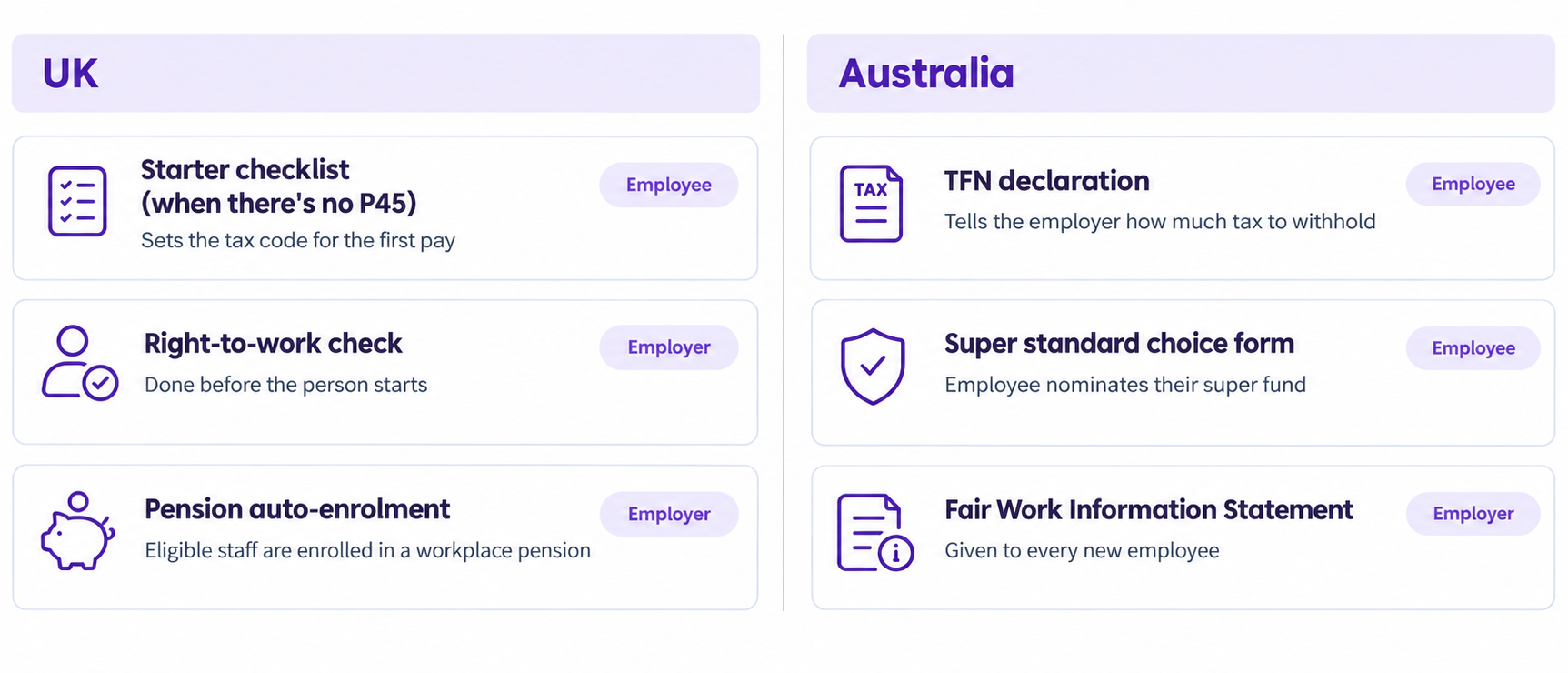
In the UK, a new hire without a P45 from a previous employer completes HMRC’s starter checklist, which lets the employer work out the right tax code for the first pay. Right-to-work checks are a separate legal step that has to happen before the person starts, and the Home Office’s employer's guide sets out the accepted methods. Employers also have to enrol eligible staff into a workplace pension, and the Pensions Regulator explains what that involves.
In Australia, the tax file number (TFN) declaration tells the employer how much tax to withhold, and the ATO offers it, along with the super standard choice form, as an online employment form as well as on paper. The super form lets the new employee nominate the fund that receives their contributions. On the employer's side, the Fair Work Information Statement must go to every new employee before they start, or as soon as possible afterwards.
How to collect new hire paperwork digitally
Print, sign, scan and email breaks in predictable places. The week before someone starts, you're left with a half-filled W-4, a blurry photo of their ID and a handbook acknowledgement that never came back. Digital new hire paperwork fixes this because the request itself sets out what has to come back and in what format, and electronic new hire paperwork leaves a record of what arrived and when.
Content Snare is built for exactly this job. You set up the new hire request once, save it as a template, and send every hire the same link, with no login for them to create. That is how you collect new hire paperwork online without chasing anyone over email.
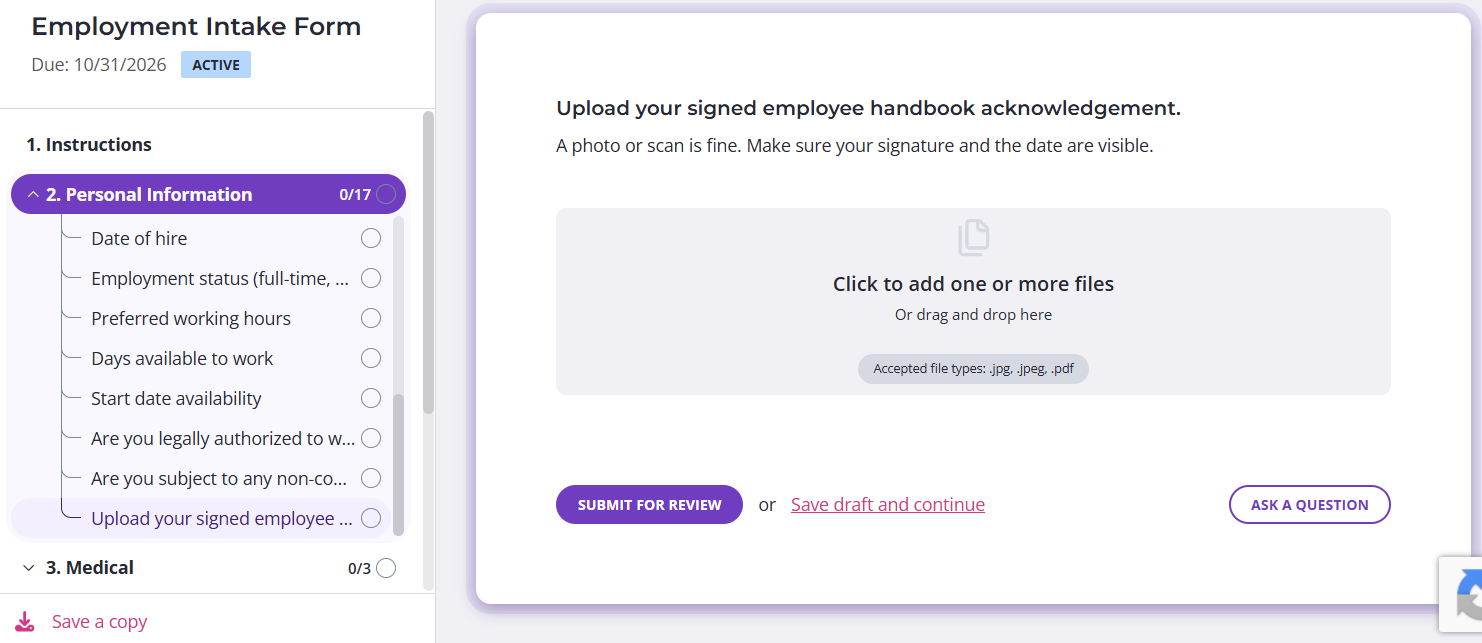
Content Snare’s employment intake form template
These are some of the key Content Snare features that do the work:
- Reusable templates to make sure every hire gets the same checklist
- A no-login link, so new hires upload and sign from their phone
- Automatic reminders, with 350,000+ reminder emails sent a month, so nobody has to chase for info
- File type rules, so IDs and signed forms come back in a usable format
- Reject and comment on anything unreadable, so the new hire sees what to fix
- Export of the finished packet into the employee's file
Candice Coker, Talent Acquisition Manager at Total Education Solutions, spent around 30 minutes setting up her first Content Snare template, and the document gathering largely ran itself after that. Here is how she describes the difference:
“Our process was initially taking about three to four weeks with a lot of back and forth, and it wasn't as clear as to what was needed. Once we implemented Content Snare, we were able to get our process down to slightly under two weeks.”
That drop, from three to four weeks to just under two, came from cutting out the back and forth, and the same approach works for the forms on your checklist, from the I-9 and W-4 to signed policies and direct deposit details. Each one is requested in the right format and chased automatically. The finished packet is ready for whoever handles payroll setup.
Content Snare covers the collection step only. Your payroll or HR system still runs payroll and any government filing, including the state new-hire report.
Document collection
Set the paperwork request up once, send one link, and let the reminders do the chasing.
New hire paperwork best practice
A few habits keep the paperwork from stalling, whichever region you hire in. They work as the ground rules behind any reliable new hire onboarding checklist.
- Send the paperwork before day one, so the new hire completes it at home instead of during their first morning.
- Use the same new hire paperwork checklist for every hire. That way nothing depends on someone remembering what was sent last time.
- Mark required forms separately from recommended ones, so the legal essentials like the I-9 and W-4 get chased first.
- Keep sensitive documents out of email. ID scans and bank details are safer collected through a secure upload than left sitting in inboxes, and Content Snare’s security page explains how it protects them, starting with its ISO 27001 certification.
- Record what was collected and when, so you can show a complete file if anyone asks later.
Taken together, these habits turn onboarding paperwork into a routine you can repeat for every hire. They also depend on having one place where everything arrives, which is what the single online request described above provides. For the questions to put on the form itself, see our employee onboarding form guide and 50 questions to ask new hires.
FAQ
What paperwork does a new hire need to complete?
In the US, a new hire completes Form I-9 and Form W-4, along with a state tax form and a direct deposit form. Company paperwork such as the handbook acknowledgement is added on top. The new hire documents checklist above shows every form by region and whether it is required or recommended.
What's the difference between Form I-9 and Form W-4?
The I-9 verifies that the employee is authorised to work in the US. The W-4 tells the employer how much federal income tax to withhold from their pay.
What new-hire forms are required in the UK and Australia?
In the UK, the key items are the starter checklist (when there's no P45) and right-to-work checks. In Australia, new employees complete the TFN declaration and the super standard choice form. Australian employers also give each new employee the Fair Work Information Statement.
Can you send new hire paperwork electronically?
Yes. You can send the whole checklist as one online request, and the new hire uploads documents and signs from their phone. Content Snare does this with a no-login link, automatic reminders and an export into the employee's file.
What documents should a new hire bring on day one?
Their I-9 identity documents, if those haven't already been verified, plus anything role-specific such as licences. Everything else can be collected before day one, which leaves the first morning for the job itself.
Who files the state new-hire report?
The employer files it, not the employee. Employers submit it through the state's new-hire portal, and deadlines vary by state, so check your state's requirements.
Onboarding paperwork
Build the checklist once, send one link and get a complete packet back for every hire.