
Most clients will either deliver the wrong or incomplete files when you ask them to send over some documents. It’s a common issue among client-facing firms, with recent studies showing that document collection challenges result in a 21.3% productivity loss.
In this article, we’ll show you how to build a client document checklist that actually gets used. Spoiler alert: the secret is using a tool like Content Snare to automate the back-and-forth and help clients send exactly what you need on time.
Let us show you how it works!
Make it easy for clients to respond by sending our user-friendly forms.
Keep your requests top of mind with automated reminders.
Why don't clients send the right documents in the first place?
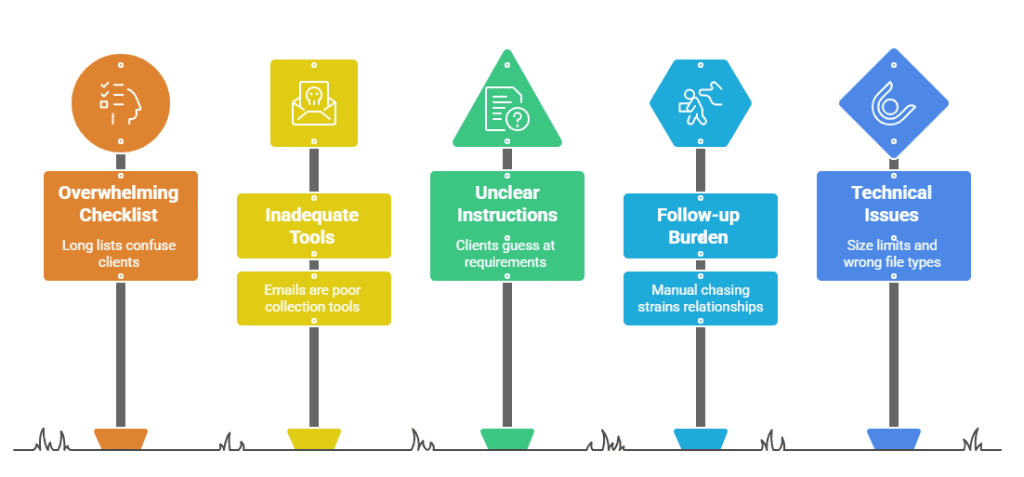
Strange as it may seem, the document collection workflow is often more complicated than it looks, especially from your clients’ perspective. Here are a few key confusion factors:
- Your checklist makes things harder: Long or cluttered lists overwhelm clients. If everything looks equally important or the layout is confusing, they’ll either skip items or upload the wrong things just to move on.
- You’re using the wrong tool to collect files: Emails and spreadsheets feel like an obvious choice, but they definitely don’t make for good document checklist tools.
- Clients have no idea what you need or why: If your instructions aren’t clear or backed by examples, they’ll take their best guess and send whatever seems close enough.
- The follow-up problem: Manually chasing clients for missing files eats into your team’s day and tends to strain relationships. After all, no one enjoys sending or receiving repeated “just checking in” messages.
- File size limits and wrong file types: Clients will often try to upload large documents that bounce back or send images instead of PDFs because they don’t know what format you need.
All of these issues add up to wasted time and unnecessary frustration for both you and your clients.
Making a perfect client document checklist with Content Snare
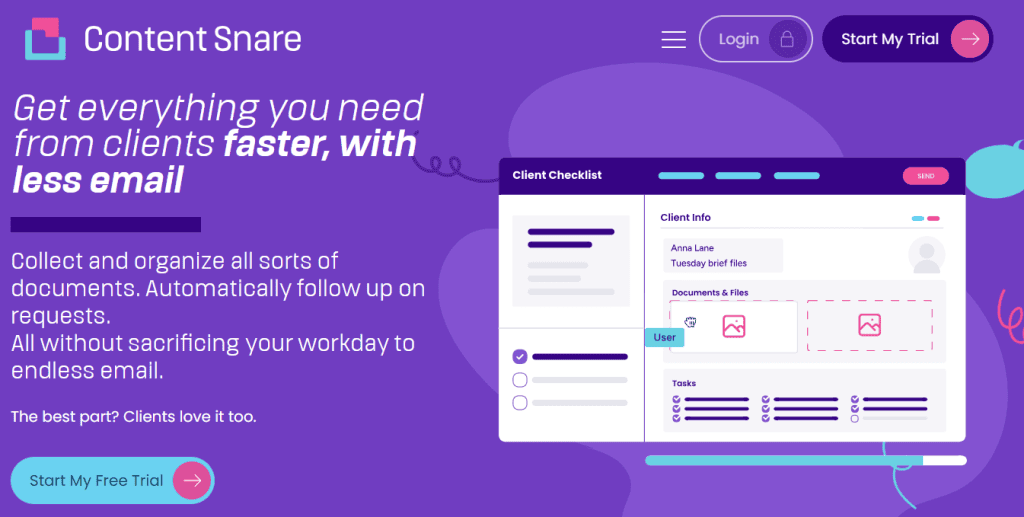
Content Snare enables you to design simple but highly effective client document checklists, keeping your data-gathering workflow as frictionless as possible. That’s why firms using Content Snare spend 71% less time gathering information and see a 67% reduction in stalled projects.
Our secure client portal software provides you with a broad range of advanced document collection features, but we’ll point out just a few of them here.
Drag-and-drop builder to build checklists in minutes
The system is user-friendly because it helps you create a structured checklist in a matter of minutes. You can use the drag-and-drop builder to add pages, sections, and fields in any order that fits your workflow. It’s flexible and designed so anyone on your team can build or edit requests without training.
Add multimedia instructions
Content Snare allows you to provide clear direction with text, images, or short videos. For instance, a quick example or short clip often does more than a paragraph of written guidance:
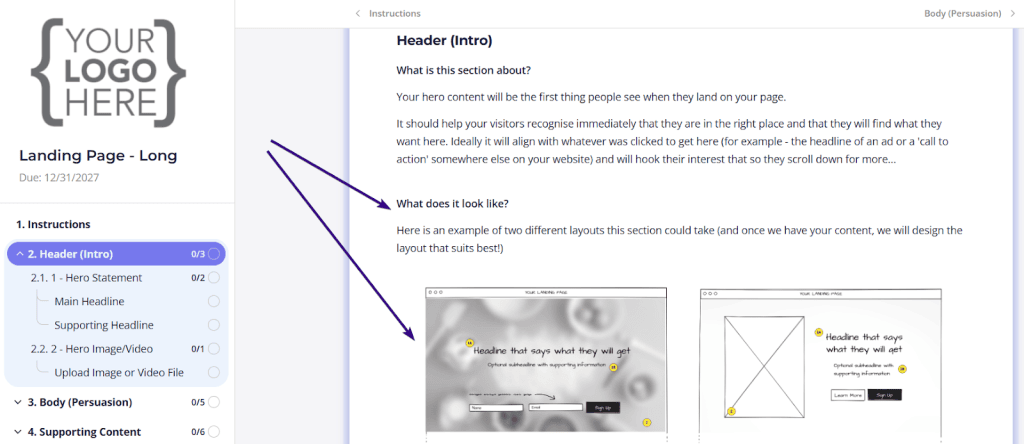
Image source: Content Snare’s template library
Set and forget automation
Once you’ve defined your checklist, Content Snare handles the follow-up. All it takes is to define your communication schedule - or simply choose the default one - and clients will get gentle automated nudges.
Track progress easily
You can see every client’s progress at a glance because the main dashboard shows what’s complete and what’s still outstanding, so you always know where things stand.
Supporting large files of all types
Your clients can upload documents up to 16 GB each, which means fewer “file too large” errors and no need for clunky third-party file sharing. Besides that, Content Snare supports dozens of file types, so clients can send PDFs, spreadsheets, images, or videos without you worrying about compatibility issues.
How do we know it works?
The proof that Content Snare works comes straight from the professionals using it every day. Firms in industries like accounting, real estate, law, and web design have traded confusing email threads for an automated process, and they’re now collecting complete documents with ease. Take a look at this comment from Liston Newton Advisory:
Content Snare has increased our efficiency by 50%, but we're still continuously improving it. Data accuracy and completeness improved massively, I would say 70%.
Content Snare’s success isn’t just reflected in user stories, but also backed by consistent recognition and strong reviews across trusted platforms. The software holds an average rating of 4.9 stars on Capterra, 4.7 on G2, and 4.9 on the Xero App Store, with thousands of professionals sharing similar experiences. More than 1,600 firms worldwide rely on Content Snare to simplify client document collection and keep projects moving smoothly.
Make it easy for clients to respond by sending our user-friendly forms with detailed instructions and generous file size limits.
FAQ
What’s the best way to ask clients for documents without sounding pushy?
Be clear, specific, and friendly. Instead of chasing or repeating requests, give clients one simple checklist that shows exactly what’s needed and why. When the process feels organized and easy, clients respond faster without feeling pressured.
Can I customize my document checklist in Content Snare for different types of clients?
Yes, you can customize document checklists in Content Snare. You can create unique checklists for each client type or reuse templates from previous projects. Everything is fully editable, so you can adjust sections, instructions, and file requirements to fit each engagement.
How can I make sure clients actually understand what I’m asking for?
Add short, plain-language instructions or quick examples for every item. Content Snare also lets you include images or videos, which helps clients see exactly what’s expected before they upload anything.
Does Content Snare remind clients automatically if they forget to upload something?
It does. Once you set up your checklist, the system sends automatic reminders on your schedule. You stay informed without having to send a single follow-up email manually.