The interviews went well and the offer letter was drafted, and all that remains is a call to someone who worked with the candidate a few years ago. It’s tempting to treat that call as a formality, but a reference check is the last cheap step you get before a hire becomes a commitment.
Speed matters here too. The best candidates spend an average of just 10 days on the job market, according to SmartSearchInc data in our recruitment statistics roundup, so a check that drags on for a week can cost you the hire. In this post, we give you the questions to ask and a simple way to send them.
The reference check questions
Below are 24 questions in five groups. Take the whole set, or choose the groups that suit the role.
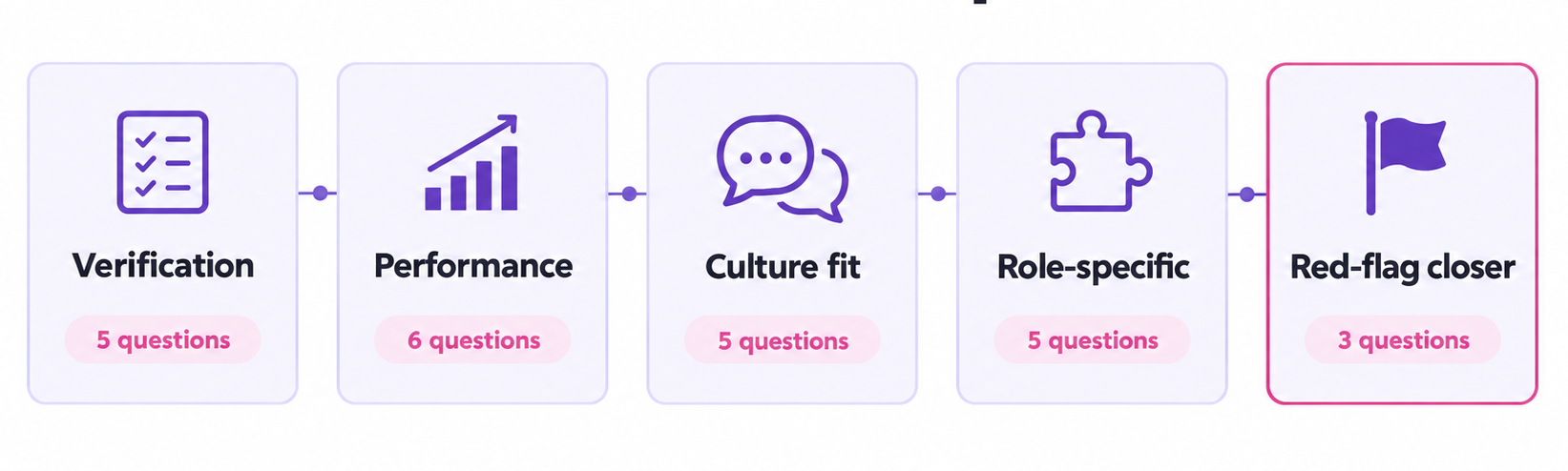
Employment verification
Start with the facts. These are easy for a referee to answer, and they set up the rest of the conversation.
- Can you confirm the candidate’s job title and main responsibilities?
- What were the start and end dates of their employment?
- In what capacity did you work with them, and for how long?
- Why did they leave the role?
- Were they full-time, part-time or contract?
If the referee’s dates or job title differ from the CV, ask a follow-up before you move on. Honest mix-ups happen, and it’s easier to clear them up early.
Performance and reliability
These questions show how the candidate did the job day to day.
- What were the candidate’s greatest strengths?
- What were their most significant contributions or accomplishments?
- How would you rate the consistency and quality of their work?
- How reliable were they with deadlines and attendance?
- In what areas did they need the most support?
- How did they handle a heavy workload or pressure?
Ask for a specific example behind each answer. A referee who can name a project or a deadline is usually speaking from first-hand experience.
Behaviour and culture fit
Use these to see how the person works with others and what helps them do their best work.
- How did they communicate with the team and with clients?
- How did they work within a team, and how did they handle disagreement?
- How did they respond to feedback or coaching?
- What kind of environment or management style got the best out of them?
- How would you describe their integrity and professionalism?
Question 15 often gets the most revealing answer in this group, because it shows whether your own team and management style would suit the candidate.
Role-specific questions
Swap in the competencies from your own role brief. If you don’t have one yet, our hiring manager intake form helps you pin down what the role needs. These five examples show the idea.
- How did they develop and manage the people who reported to them?
- Did they consistently meet their targets, and how did they build pipeline?
- How did they approach problem-solving and quality under deadline?
- How did they handle a difficult customer, patient or client?
- How quickly did they pick things up, and how did they take direction?
Two or three role-specific questions are usually enough. Add many more and the call starts to feel like a second interview.
The red-flag closer
Save these for last. Referees tend to be generous, so how they answer often matters more than what they say.
- Would you hire or work with this person again? Why, or why not?
- On a scale of 1 to 10, how likely would you be to rehire them, and what’s stopping it from being a 10?
- Is there anything about their suitability for this role I haven’t asked that I should know?
Question 23 is the one to pay most attention to. A referee who says 10 straight away is giving you a clear signal, while a long pause or a score of 7 is your cue to ask what held it back.
What a reference check form should include
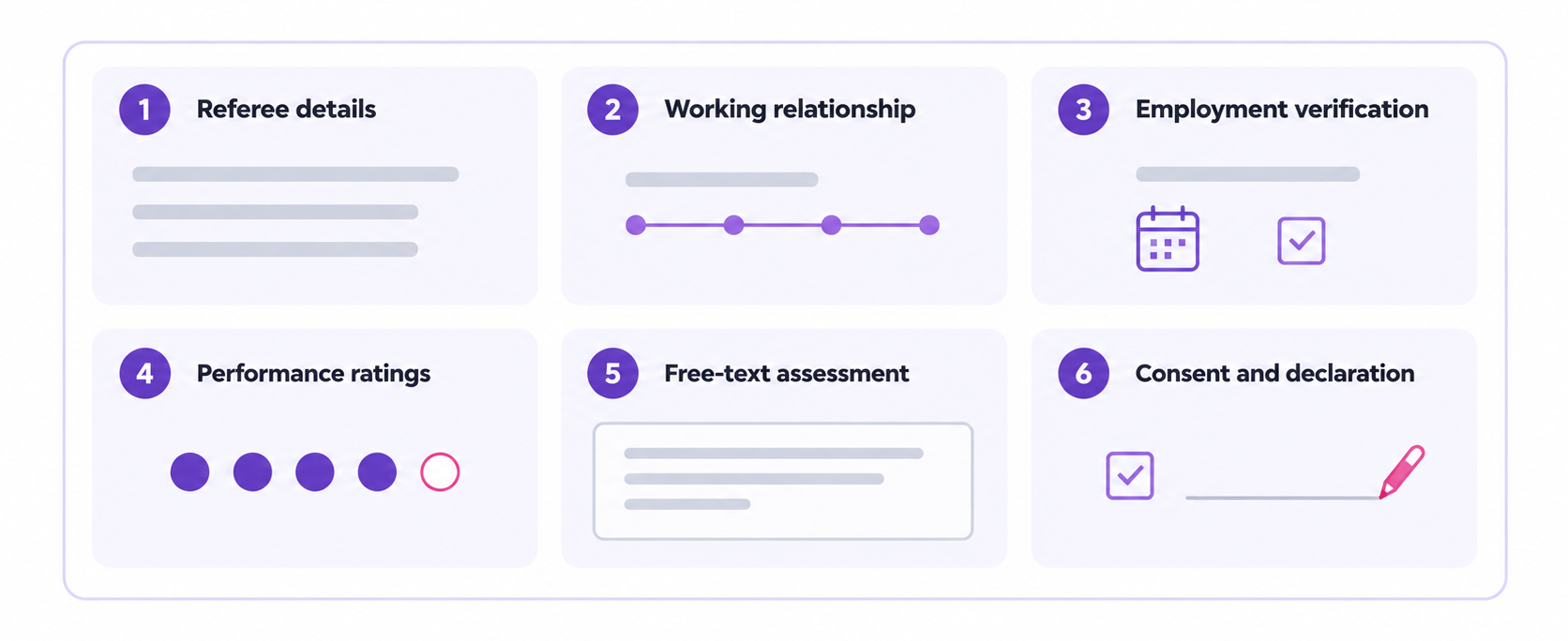
A good reference check form keeps every referee’s answers in the same shape, which is what makes candidates easy to compare. Six field groups cover what you need, and you can save them as a template to reuse for every hire.
- Referee details: Name, job title, company and contact details.
- Working relationship: How they know the candidate and for how long.
- Employment verification: Job title, dates, responsibilities and reason for leaving.
- Performance ratings: A 1 to 5 scale for each area you care about.
- Free-text assessment: The referee’s own words on strengths, gaps and whether they would rehire.
- Consent and declaration: The candidate’s written consent and the referee’s signed declaration.
Structure beats a two-line email reply because every referee answers the same questions in the same format. If you also need the candidate’s own details, our recruitment questionnaire template covers that side of the process.
Send it online instead of by email
Anyone who has run a reference check knows how this goes. You’ll likely email a referee and hear nothing, so you’ll follow up, and then the phone tag begins. When replies do arrive they come in three different formats, and the offer sits waiting on someone who isn’t even the candidate.
Content Snare takes most of that chasing out of the process. It makes it possible to build the form once by pasting the questions above into the AI request builder, or use the drag-and-drop builder, and save it as a template. From there you send the referee a link that needs no login, and automatic reminders go out until they finish.
Content Snare sends 350,000+ reminder emails a month, so nobody on your team has to be the one nudging. Once the form is complete, the answers export into the candidate’s file. Candice Coker, Talent Acquisition Manager at Total Education Solutions, described the effect on her own hiring process:
“Our onboarding process was initially taking three to four weeks with a lot of back and forth... Once we implemented Content Snare, we got the process down to under two weeks.”
That’s the same back and forth a reference check creates on a smaller scale. Once the references clear, you can build a separate request in Content Snare to collect the new hire’s own documents, and our employee onboarding form is the natural next step. If you’re still comparing tools, our guide to reference check software sets the options side by side.
Reference checks
Paste your questions into the request builder, send the referee a link and let reminders handle the follow-up.
How to run a reference check
A consistent process protects both you and the candidate. These steps keep it simple.
- Get written consent from the candidate before you contact anyone.
- Put the same core questions to every candidate’s referees.
- Check at least two references, including a direct manager.
- Keep every question tied to the job.
- Note answers word for word.
- Pay attention to hesitation.
Notes taken at the time are far more useful than a summary written the next day, especially if you later compare two candidates for the same role.
Reference check questions to avoid
Questions about age or race have no place in a reference check, and neither do questions about religion or disability. The same goes for health and pregnancy, and for marital or family status and national origin. The EEOC explains which employment practices are prohibited. If a referee volunteers something personal, steer back to the job and leave it out of your decision.
If a third-party screening company runs the check for you, consent and disclosure rules under the Fair Credit Reporting Act (FCRA) can apply. The FTC’s guide for employers sets out what that involves, and your HR lead or legal adviser can confirm what applies to your setup.
FAQ
What questions should you ask in a reference check?
Start by confirming the role, the dates and why the person left. After that, ask how they handled pressure and feedback, and how they worked with the team. Finish with the rehire question.
What is the single best question to ask a referee?
“On a scale of 1 to 10, how likely would you be to rehire them, and what’s stopping it from being a 10?” It’s hard to answer with a stock phrase, and hesitation usually tells you more than praise does.
How many references should you check?
At least two, and one should be a direct manager where possible. Different referees see different sides of the same person.
Do you need the candidate’s consent?
Yes, get it in writing before you contact anyone. If a screening company runs the check, FCRA rules can apply as well.
How do you send a reference check form online?
Send the referee a link to a structured form, with automatic reminders until they finish. With Content Snare the link needs no login, and every answer comes back in the same format.
Can you automate reference checks?
Yes, the sending and the chasing can run on their own. The follow-up conversation still needs a person.