
Most AI talks feel like they were written by robots, for robots. But what if you’re not a developer or data scientist, and still want to use AI to make your work easier and a whole lot more productive?
That’s exactly what Jared Brintz, Senior Marketing Manager at Intuit, tackled in his opening session at this year’s Content Snare AI & Automation Summit. Instead of diving into buzzwords and tech demos, Jared focused on what really matters to accountants and bookkeepers: using AI right now to eliminate repetitive tasks and reclaim precious time, without needing to write a single line of code.
Let’s dive into his most important insights.
ABOUT
Jared Brintz
Jared Brintz is the Senior Marketing Manager at Intuit, where he leads digital acquisition strategies for the accountant segment. With a background in both marketing and tech, Jared works closely with accounting professionals to help them adopt time-saving tools, with a particular focus on AI.
The AI misconception

A common assumption in the accounting world is that AI is only useful if you’re highly technical: a person who codes or knows how to build workflows. But Jared says this couldn’t be further from the truth:
“I’m not a developer, I’m not an engineer. I’m just a regular guy trying to use AI to get more productive and see what’s possible.”
In his opinion, AI tools like ChatGPT, Gemini, or Intuit Assist don’t require programming skills. All they require is better instructions, which means knowing how to clearly communicate what you want the AI to do. In other words, the biggest wins don’t come from building custom systems, but rather from learning how to talk to the tools you already have access to.
Why better prompts matter more than technical skills
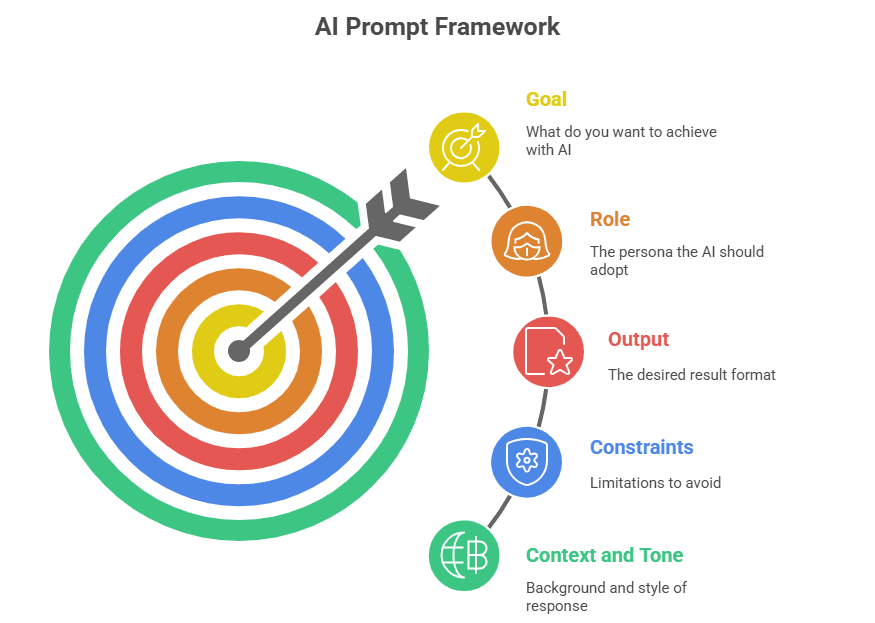
Instead of focusing on how AI works behind the scenes, it’s better to learn how to communicate with these tools in a clear and structured way. The more thoughtful and specific your prompt, the more reliable and useful the output. That’s why using a simple prompt framework can make a huge difference, especially for professionals who aren’t coming from a technical background.
The framework includes a few key elements:
- Goal: What do you want the AI to achieve?
- Role: Who should it act as? For example, a senior financial analyst.
- Output: What kind of result do you need? For instance, a checklist or a report.
- Constraints: What should be excluded or avoided?
- Context and tone: What background info does it need, and how should the response sound?
This structure helps the AI understand your intent more clearly and reduces the chances of receiving generic or inaccurate results. For accounting professionals dealing with structured tasks and client communication, mastering this kind of prompt writing can lead to immediate productivity gains.
Interestingly, even the way you speak to the AI can improve its performance. Research has shown that adding emotional instructions or being polite can lead to noticeably better results.
How to turn prompts into real productivity gains
Prompting well directly impacts how efficiently you can get work done. In practical terms, this means faster client onboarding with automatically generated checklists, clearer financial reporting pulled from uploaded spreadsheets, and sharper analysis surfaced in seconds, without having to build anything from scratch.
For instance, AI systems can take a basic profit and loss statement and return a clean executive summary while highlighting trends or identify anomalies based on the instructions you give. This is how Jared puts it:
“So if you think this saves you 30 minutes, or an hour, and you work with 30, 40, 50 clients, you can extrapolate what that value looks like.”
The best part is that these aren’t abstract use cases. On the contrary, they reflect the real, day-to-day needs of busy accounting teams. When used intentionally, AI becomes more than a curiosity. It becomes a reliable assistant that helps firms reclaim time, reduce manual effort, and create more consistent outputs across the board.
AI tools you can try today
While AI can seem complex from the outside, there are already several tools that accounting firms can start using immediately to reduce admin and improve the client experience. Here are a few that stand out - not because they’re flashy, but because they solve real operational challenges.
Google Gemini
Gemini is an AI assistant from Google that handles a range of text-based tasks. For instance, accountants can use it to analyze spreadsheets, generate financial summaries, write internal checklists, or even draft client communications.
Content Snare
Collecting information from clients is one of the most frustrating and time-consuming parts of running an accounting practice. Content Snare simplifies this process with an AI-powered smart request builder:
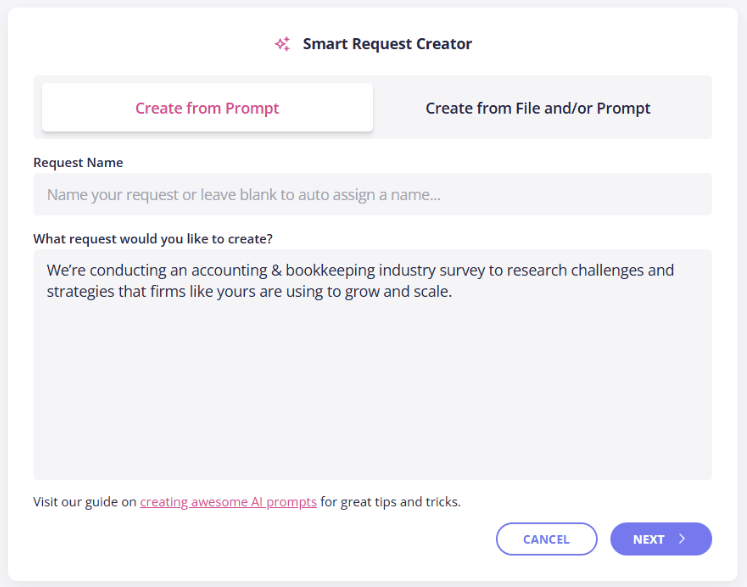
One option is to describe the type of form or request you want to create and Content Snare will automatically build a form with the right data types, adding dropdowns, dates, file uploads, or text fields as needed. Another option is upload a PDF document as a base for creating the request. Optionally, you can also provide context for the file by describing what you want to achieve.
That way, clients see exactly what’s required, and your team spends far less time chasing the same information.
Related: How Liston Newton Advisory Achieved a 50% Efficiency Boost with Content Snare
ChatGPT
Well-known and widely adopted, ChatGPT is perfect for content generation, process documentation, and even brainstorming workflows or automation ideas. Whether you need a client engagement letter draft, an internal SOP, or a response to a tricky client email, it can help speed up the thinking and writing process. Its flexibility makes it a strong general-purpose assistant.
QuickBooks with Intuit Assist
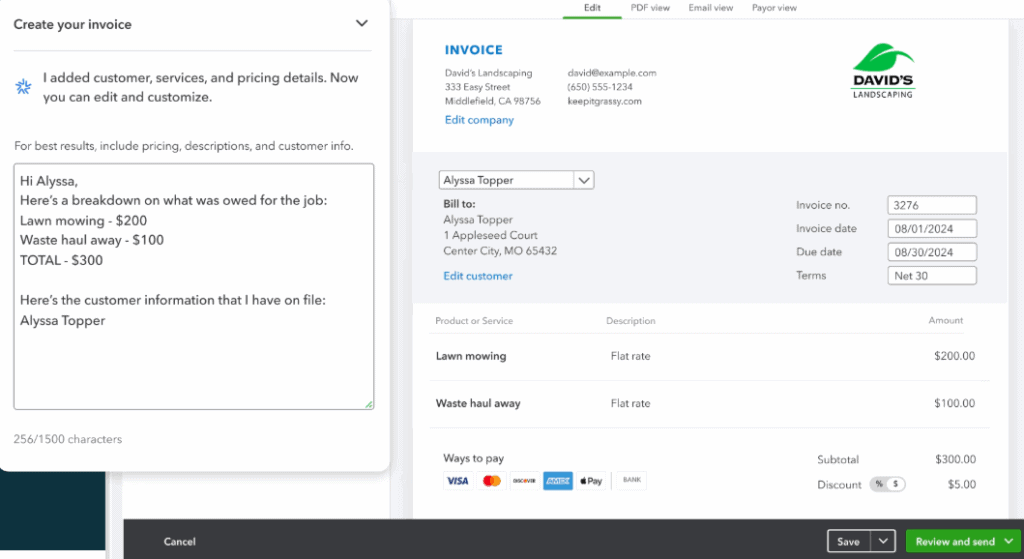
QuickBooks’ built-in AI assistant, Intuit Assist, is designed specifically for small business and accounting workflows. It can help surface key financial insights, flag anomalies, generate daily summaries, and handle follow-up tasks like drafting invoice reminders. One of its strengths is contextual awareness—because it works within the QuickBooks platform, it can draw on real financial data in real time.
Final thoughts: Evolve with the tools, not against them
The rapid rise of AI isn’t just changing how accounting firms work, but it’s also changing everyone’s expectations. Clients want faster turnaround times and better insights. Internally, teams are stretched thin and looking for ways to do more without burning out.
The firms that succeed in this environment won’t necessarily be the ones with the most software: they’ll be the ones that know how to use it well. That’s why prompt literacy and a culture of experimentation are quickly becoming core skills in modern practices. The good news is that you don’t need to overhaul everything.
With small and focused improvements in how your team interacts with AI tools, it’s possible to achieve big productivity gains over time. Failing to adapt means falling behind because others are already finding smarter ways to work. As Jared Brintz concluded:
“We’re not really gonna be replaced by robots. We might, however, be replaced by people who know how to use AI tools and put them to work to drive efficiencies and scale quicker than you actually might think.”