
Most automation talks sound like they were built for engineers, not everyday professionals. But what if you’re not technical and still want to get rid of repetitive work to make your accounting practice more productive?
That’s what James Rose, co-founder of Content Snare, discussed in his session at this year’s AI & Automation Summit. Instead of focusing on complex processes, James shared how accountants and bookkeepers can use no-code tools like Zapier and Make to create behind-the-scenes workflows that save time and reduce manual effort.
Here’s a breakdown of the most practical tips from his talk, and how you can start automating even if you’ve never used these tools before.
ABOUT
James Rose
James Rose is the co-founder of Content Snare, a software platform that helps professionals collect content and files from clients. Once an automation engineer, his new priority is to help business owners regain their lives, be more productive and get more done in less time.
Why Zapier is the perfect starting point for beginners
If you’re new to automation, Zapier is one of the easiest ways to get started. It doesn’t require any coding, works with over 8,000 apps, and is built around a simple idea: connecting tools so that actions in one app automatically trigger results in another.
As James put it:
“When something happens in one app, do this thing in another app. It’s really that simple.”
These automations are called Zaps, and they’re made up of two basic parts: a trigger (the thing that kicks off the workflow) and an action (what you want to happen next). For example, when a new client fills out a form, you could automatically add their details to a spreadsheet or send a welcome message.
Zapier also offers thousands of templates to help you get started fast, and it integrates with most of the tools accounting teams already use, such as Google Sheets, Slack, Microsoft 365, and CRMs. It's a low-barrier but high-impact way to experiment and build your confidence with automation.
Related: How to automate your firm the right way with Isaac Perdomo
Building your first automation: A client contact alert example
One of the simplest ways to get started with automation is by setting up a workflow that sends you a text message whenever someone fills out a contact form on your website. It’s a quick win that ensures you can follow up immediately—without having to sift through your inbox or CRM.
This kind of automation can be set up using three tools:
- Content Snare to collect client information
- Zapier to connect everything
- Twilio to send the SMS
The entire setup takes just a few steps and doesn’t require any custom code or technical configuration. You simply map the form fields to the message you want to receive, and Zapier handles the rest. It’s a great first project to test the waters with accounting automation software: and once you see it working, it’s hard not to start thinking about what else you can streamline.
Automation of accounting processes: Multi-step automations and filtering logic
Once you’ve built a basic workflow, the next step is learning how to add logic, so your automations only run when it makes sense. This is where multi-step Zaps and filters come in.
For example, let’s say someone fills out your contact form: instead of sending an alert for every single submission, you can automatically run a lead scoring check to estimate how valuable the contact might be based on details like company size or location. If the lead meets certain criteria (like having more than 50 employees), you can then continue the workflow and send an SMS to your sales team for immediate follow-up. If not, the workflow quietly ends there.
This kind of filtering keeps your team focused on high-priority leads, and prevents unnecessary notifications for every form submission. It’s still simple to set up, but adds a layer of intelligence that can make a big difference.
Automating accounting client onboarding from end to end
Onboarding new clients is one of the most repetitive and time-consuming parts of running a practice—but it's also one of the easiest areas to automate with real impact. For example, once a client signs a proposal in a tool like Ignition, you can automatically trigger a series of onboarding workflows:
- Send a pre-built onboarding checklist through Content Snare
- Create folders and subfolders in Google Drive
- Share files with the client
- Generate internal tasks in a project management tool like ClickUp or FYI
- And even draft a personalized welcome email so your team can review and hit send
This type of setup replaces hours of manual admin without sacrificing the personal touch. For example, instead of sending a generic email, you can use automation to generate a draft that includes client-specific details, and then quickly edit it before it goes out. It’s efficient, but still feels human.
When everything runs in the background, your team can focus on what really matters: supporting the client, instead of chasing forms and files.
Many other accounting automations are worth exploring
Bear in mind that this is just a glimpse into what’s possible. Other onboarding automations covered in the session included creating client records in FYI or ClickUp, sending draft welcome emails via Gmail or Outlook, setting up personalized video tasks in Bonjoro, and so on. You can easily mix and match different workflows to suit the tools your team already uses.
Automation for accountants: Best practices to be aware of
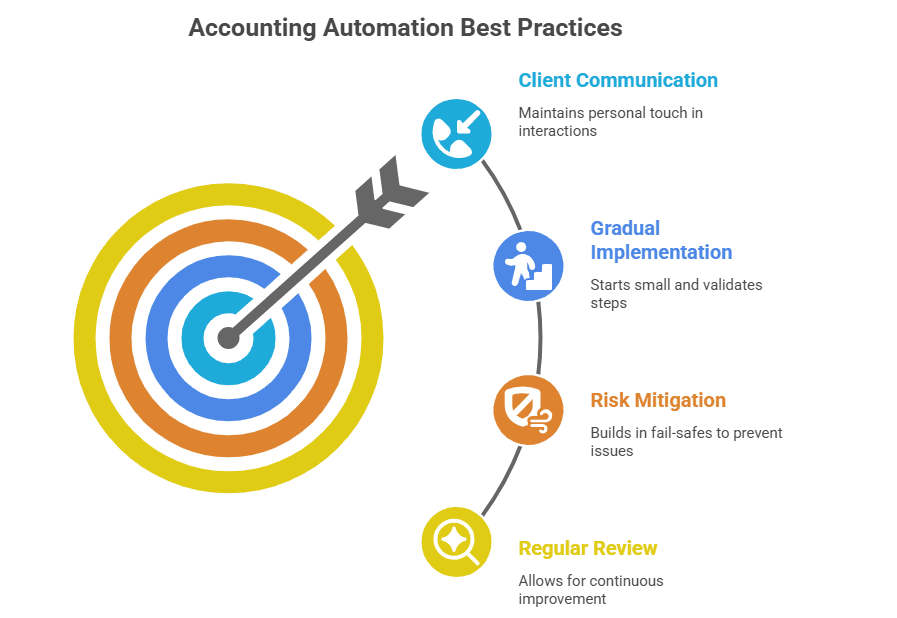
One of the biggest concerns around automation, particularly in client-facing roles, is that it might make communication feel cold or robotic. But it doesn’t have to be that way: the key is to use automation to take care of the repetitive structure, not the human connection.
For example, instead of automatically sending an email, you can have Zapier or Make create a draft that includes all the relevant client info. That way, someone on your team can quickly review, tweak the message, and send it with a personal touch.
This is how James explains it:
“I generally never automate client comms directly. Always draft something and then personalize it.”
Other important tips include the following:
- Start small and validate before expanding: For instance, launch one automation at a time, and make sure it works exactly as expected. It’s tempting to set up a dozen automations in one go, but debugging them later can get messy. On the other hand, simple workflows are easier to monitor and maintain.
- Build in fail-safes: A good example is including fallback notifications in Slack or Teams when a key automation runs, so your team stays in the loop and can spot anything unusual early. Similarly, keep logs or backups of automated actions in a Google Sheet or Airtable, especially for critical tasks like client onboarding or compliance steps.
- Review your automations regularly: As your workflows evolve, what made sense six months ago might no longer be the best approach. Create a recurring task to audit key automations: clean up what’s outdated, refine what’s working, and look for new opportunities to save time.
Final thoughts: Don’t wait and start small
If accounting automation still feels overwhelming, that’s totally normal. But the truth is, you don’t need to overhaul your entire practice to see real results. Even one small but well-placed workflow can eliminate repetitive tasks and free up your team’s time for more valuable work.
The trick is to start with something simple like a form that sends an alert, or a checklist that goes out after a proposal is signed. Once you see the time saved and the mental load lifted, it’s hard not to keep going.
James Rose summed it up nicely:
“Maybe I'm lazy, but I just keep doing more stuff. It’s just nice knowing that stuff's going on in the background too.”